5 Best OBD2 Scanners for Toyota (November 2026)
The best OBD2 scanners for Toyota include the LAUNCH Creader Elite 3.0 for Toyota for multi-job Toyota maintenance, the LAUNCH Creader Elite X500 for Toyota for electrical fault tracing, and the XTOOL IP500 for Toyota for Scion households.
On this page (8 sections)
- Which OBD2 scanner for Toyota fits each job?
- The best OBD2 scanners for Toyota
- How should you choose an OBD2 scanner for a Toyota?
- How do you set up a Toyota scanner for its first scan?
- What can a Toyota scanner tell you before a repair?
- Which mistakes waste money or create extra work?
- How should you store and care for a Toyota scan tool?
- Which Toyota OBD2 scanner should you choose?
The LAUNCH Creader Elite 3.0 for Toyota is the best OBD2 scanner for Toyota owners here who want broad diagnostics and supported maintenance functions. Choose the XTOOL IP500 instead if Scion coverage or a larger display matters more.
The right scanner depends on the job you actually plan to do. Reading an engine code, diagnosing an ABS warning and completing a brake service require different levels of access.
For a wider view of scan types, compare these picks with our best OBD2 scanners for DIY car owners and best bidirectional scan tools. If you need help understanding active tests, see what a bidirectional scan tool is.
Our picks at a glance
-
1
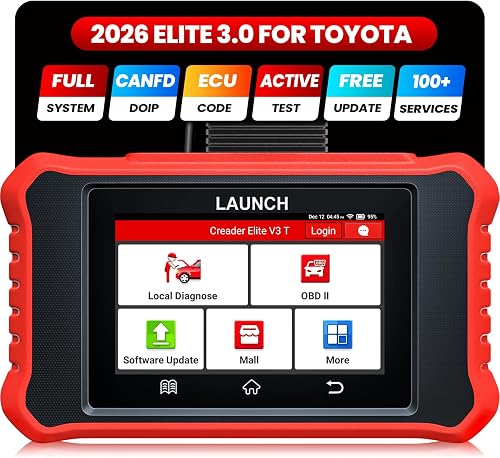 Best for multi-job Toyota maintenance
LAUNCH Creader Elite 3.0 for Toyota
7.2/10 our score
See it on Amazon -
2
 Best for electrical fault tracing
LAUNCH Creader Elite X500 for Toyota
7.0/10 our score
See it on Amazon -
3

- 4
 Best for older-car code checksCheck it
- 5
 Check it
LAUNCH Creader Elite V3.0 for Toyota
Best for repair follow-up
Which OBD2 scanner for Toyota fits each job?
Choose the first LAUNCH for several types of Toyota maintenance, the XTOOL for a compatible Scion, or the ANCEL for focused code checks on older vehicles. The other LAUNCH versions are alternatives when their exact supported functions better match your repair.
Use the comparison below to narrow the field, then check the required module or service procedure. A brand name and model-year range are only the start of a compatibility check.
| Product | Best for | Coverage | Screen | Updates | Our score |
|---|---|---|---|---|---|
| LAUNCH Creader Elite 3.0 for Toyota | multi-job Toyota maintenance | Toyota and Lexus; confirm year, model and configuration | 4-inch touchscreen | Lifetime free core Wi-Fi updates; added-brand updates may require renewal | 7.2 |
| LAUNCH Creader Elite X500 for Toyota | electrical fault tracing | Toyota and Lexus; Auto VIN for compatible 2006 and newer vehicles | 4-inch touchscreen | Lifetime free Wi-Fi updates | 7.0 |
| XTOOL IP500 for Toyota | Scion households | Toyota, Lexus and Scion, 1996–2024; confirm vehicle support | 5.45-inch touchscreen | Lifetime free Wi-Fi updates | 7.0 |
| ANCEL TD700 for Toyota | older-car code checks | Most Toyota, Lexus and Scion models from 1996–2021 | 2.8-inch screen | 6.9 | |
| LAUNCH Creader Elite V3.0 for Toyota | repair follow-up | Toyota and Lexus; confirm year and model compatibility | 4-inch touchscreen | Lifetime free Wi-Fi updates | 6.8 |
The best OBD2 scanners for Toyota
The LAUNCH Creader Elite 3.0 for Toyota leads this group for its mix of system access, component commands and service functions. The remaining choices suit different vehicles or tasks, with substantial overlap among the LAUNCH tools.
Best Toyota OBD2 scanner for several maintenance jobs
LAUNCH Creader Elite 3.0 for Toyota: Best for multi-job Toyota maintenance
- Full-system diagnosis
- Bidirectional active tests
- Toyota and Lexus service functions
- 4-inch touchscreen
Choose this for Toyota and Lexus diagnostics across several systems, plus supported maintenance jobs. Core coverage includes free lifetime updates, while added-brand authorizations have separate terms.
Pros
- Full-system scans
- Bidirectional active tests
- Multiple service functions
Cons
- Functions depend on vehicle configuration
- Added-brand updates may require subscription renewal
Choose this LAUNCH if you maintain a Toyota or Lexus and want to investigate faults beyond the engine. It covers available transmission, chassis, body and electrical modules alongside standard engine diagnostics.
Its active controls cover supported items such as windows, mirrors, lights and wipers. These commands help when you need to see whether a component responds independently of its usual cabin control.
Service options include EPB reset, steering-angle calibration, battery relearn, throttle reset and ABS bleeding. Build your buying decision around the procedures your vehicle requires, rather than assuming every named service applies to it.
The 4-inch touchscreen gives you a self-contained interface without a separate phone. LAUNCH includes lifetime free Wi-Fi updates for core Toyota and Lexus coverage, but added-brand authorizations and their updates have separate terms.
Skip it if all you want is an occasional engine-code read, or if the job you need remains unconfirmed. It is also worth comparing the XTOOL if reading graphs on a larger display matters more than a smaller device.
LAUNCH X500 for tracing supported electrical faults
LAUNCH Creader Elite X500 for Toyota: Best for electrical fault tracing
- Full-system diagnostics
- Bidirectional active tests
- Service resets
- 4-inch touchscreen
A Toyota and Lexus option for tracing supported electrical faults with component commands and live data. Match its actuator controls to the fault you need to investigate.
Pros
- Access to multiple vehicle systems
- Commands for supported pumps, fans and body components
- Multiple service resets
Cons
- Auto VIN has a model-year limit
- Specific component commands require compatibility confirmation
Choose the X500 when your repair work calls for component commands alongside system data. It offers Toyota and Lexus access to systems including engine, transmission, ABS, airbags, steering, EPB and fuel control.
Supported commands include fuel pumps, radiator fans and body components. If a fan does not run normally, a scanner command can add a useful clue, although wiring, power supply and control conditions still need checking.
The X500 also offers maintenance functions such as oil reset, throttle relearn and ABS bleeding. Its standard OBD2 tools include freeze-frame data and readiness checks, so it can support an initial engine investigation as well.
Auto VIN applies to compatible Toyota and Lexus vehicles from 2006 onward. If automatic identification fails, follow the manual vehicle-selection process and confirm the details before continuing.
This is an alternative to the first LAUNCH, rather than a clear upgrade based on the features. Skip it if you expect a distinct capability without confirming that difference, or if Scion support is central to your purchase.
XTOOL IP500 for Scion coverage and larger graphs
XTOOL IP500 for Toyota: Best for Scion households
- Full-system diagnosis
- Bidirectional active tests
- 21+ service functions
- 5.45-inch touchscreen
The IP500 suits households with a compatible Scion or buyers who prefer a larger display for live graphs. Hybrid battery module access is included where supported, but coverage must be checked by vehicle.
Pros
- Toyota, Lexus and Scion coverage
- Larger display than the other picks
- Four-parameter synchronized live graphs
Cons
- Some models are excluded
- Service functions vary by VIN
Choose the IP500 if your household includes a compatible Scion or you prefer more screen space for diagnostic data. Its 5.45-inch touchscreen is larger than every other display in this group.
Four-parameter synchronized graphs let you compare related readings on the same timeline. This is useful when you want to see whether one value changes as another rises or falls, rather than reading isolated numbers.
XTOOL includes full-system diagnostics, with hybrid battery module access where supported. That access provides diagnostic information; it does not guarantee the remaining life of a hybrid battery or make high-voltage repairs a routine DIY job.
The IP500 also provides bidirectional controls and 21+ maintenance services. Coverage spans Toyota, Lexus and Scion models from 1996 through 2024, with exclusions, and individual functions vary by VIN.
Skip it for a newer vehicle unless XTOOL confirms support, or if you only need basic engine information. Its broader menus are useful when you have a reason to use them, especially across several compatible vehicles.
ANCEL TD700 for focused checks on older vehicles
ANCEL TD700 for Toyota: Best for older-car code checks
- ABS and transmission diagnostics
- Oil and brake service resets
- TPMS relearn on some models
- 2.8-inch screen
A focused choice for code checks and selected maintenance resets on compatible older vehicles. Skip it if your transmission service requires a fluid-temperature reading.
Pros
- Reads ABS and transmission codes
- Selected maintenance resets
- TPMS relearn on some models
Cons
- Does not display transmission oil temperature
- Coverage range ends at 2021
- Smaller screen than the other picks
Choose the TD700 for code reading and selected maintenance tasks on a compatible older Toyota, Lexus or Scion. Its stated range covers most models from 1996 through 2021 with a 16-pin interface and 12 V power.
ABS and transmission code access give it a role beyond a basic engine reader. It also supports selected oil, brake and battery-related services, plus TPMS relearn on some models.
The key limitation is clear: it cannot display transmission oil temperature. If your fluid-level procedure requires that reading, transmission code access does not fill the gap.
Its 2.8-inch display is the smallest here. That may suit brief code checks, but buyers who want to compare several graphs should look more closely at the larger-screen options.
Skip the TD700 if you need bidirectional component commands or coverage beyond its stated year range. Before choosing it for a tire-pressure job, confirm whether it supports the exact relearn you need rather than assuming it can perform every TPMS task.
LAUNCH Creader Elite V3.0 for post-repair procedures
LAUNCH Creader Elite V3.0 for Toyota: Best for repair follow-up
- Full-system diagnostics
- Bidirectional active tests
- Service resets and relearns
- 4-inch touchscreen
Consider this version for supported relearns, calibrations and resets after repairs. Its functions overlap with the first LAUNCH pick, so choose by exact vehicle support rather than the similar name.
Pros
- Full-system scans
- Supported post-repair service functions
- Shareable diagnostic reports
Cons
- Features vary by model and year
- Similar naming makes exact-version checks important
Choose this V3.0 version when its confirmed relearns, calibrations and resets match the work you plan to complete. It supports full-system Toyota and Lexus diagnostics plus commands for compatible components.
Service options include throttle relearn, steering-angle calibration, battery reset and injector coding. These are different procedures with different prerequisites, so an extensive menu does not mean you should run them after every repair.
Shareable diagnostic reports can help you keep a record before and after a job. Save the initial scan first, then compare later results once the repair and any required service procedure are complete.
This version has much in common with the first LAUNCH pick, including its screen size and core diagnostic approach. Similar names do not guarantee identical vehicle support, so identify this exact version when requesting compatibility advice.
Skip it if you cannot confirm the function that made you consider it. Buyers choosing between the LAUNCH versions should prioritize written confirmation of vehicle support and the relevant update terms over small differences in product naming.
How should you choose an OBD2 scanner for a Toyota?
Start with one real job and your exact vehicle, then buy the least complex tool that covers both. A long feature menu is less useful than confirmed access to the system you need.
Does your Toyota OBD2 scanner need full-system scans?
Choose full-system access when the warning or fault involves modules beyond standard engine and emissions diagnostics. ABS, airbags, steering and body systems need their own supported access.
“Full-system” means the tool can reach supported modules fitted to the vehicle. It does not mean every module exposes every data value, command or service procedure.
For warning lights outside the engine system, check our guide to full-system code readers. Ask about the particular module before moving on to extra features.
When does bidirectional control help?
Choose bidirectional control if you plan to trace faults by commanding components and checking their response. It is most useful when you understand what the command should do and what conditions allow it to run.
A working component response can narrow the investigation, but it does not prove that the entire circuit works under all conditions. A failed response can also reflect an unmet prerequisite rather than a broken part.
Do not pay for this feature simply to clear a check-engine light. Passive code reading and live data may cover that initial task.
Which service functions matter?
Choose service functions for jobs you already expect to perform, such as an EPB service procedure or a required relearn. Write those jobs down before comparing scanners.
A maintenance reminder, a fault code and a learned value are different things. Clearing one is not a substitute for completing the procedure associated with another.
Brake work needs the correct mechanical steps as well as any required scanner routine. A brake-bleed menu does not replace the vehicle's full bleeding instructions.
How should you check Toyota compatibility?
Provide the VIN, model year, model, engine and required function when asking for confirmation. Include hybrid status and the relevant system or transmission when those details affect the job.
Ask a narrow question, such as whether the tool reads the transmission-fluid temperature parameter on your exact vehicle. “Does it work on a Camry?” leaves too much room for a basic engine-code answer.
Keep the reply with your purchase records and verify that it refers to the exact scanner version. Toyota, Lexus and Scion support should each be confirmed for the vehicles you intend to maintain.
Do updates and extra brands change the decision?
Check what stays included and what costs extra before choosing a scanner for several brands. Free core updates and paid expansion coverage can exist on the same tool.
Do not assume a future update will add a missing function or support a newer vehicle. Buy for confirmed current capability, especially when a repair is waiting.
If avoiding recurring fees is a priority, our guide to OBD2 scanners without a subscription explains the terms worth checking. Keep update policy separate from whether a specific function works on your Toyota.
How do you set up a Toyota scanner for its first scan?
Update and charge the scanner, identify the vehicle correctly, and save an initial scan before changing anything. This creates a useful record while keeping setup separate from repair work.
Prepare the tool and vehicle
Install available software over a stable connection before starting the job. Leave enough time for downloads so you are not waiting with the vehicle's ignition on.
Park on level ground, apply the parking brake and locate the diagnostic connector. Connect with the ignition off unless the tool's instructions say otherwise, then follow the prompts for the required ignition or engine state.
A weak vehicle battery can disrupt communication and create misleading symptoms. For longer service procedures, follow the vehicle and tool instructions for suitable battery support.
Confirm the vehicle and record the fault
Check the detected vehicle details even when Auto VIN works. If identification is incomplete, use the manual selection process rather than accepting a close-looking model.
Save codes, their status and any available freeze-frame information. Note the dashboard warnings and the conditions when the fault appears, such as a cold start, warm idle or acceleration.
Avoid clearing the memory at this stage. Erasing information can make an intermittent problem harder to trace and reset emissions readiness monitors.
Start with observation before commands
Read the system information and relevant live values before running a component command. Use the vehicle's service information to understand normal ranges and required conditions.
Our how to use an OBD2 scanner guide covers the basic workflow. If you are still deciding how much capability you need, the code reader vs. scan tool guide explains the practical difference.
What can a Toyota scanner tell you before a repair?
A scanner can show where a fault was detected and what the vehicle recorded, but it cannot turn every code into a confirmed parts order. Combine codes with symptoms, inspection and relevant service instructions.
A lean-condition code, for example, describes a condition the control system detected. It does not prove that the sensor reporting it is the failed part.
Use freeze frames to understand the conditions
Freeze-frame information records available operating details associated with a fault. Engine load, temperature or speed can help you recreate the conditions rather than chasing a problem only at idle.
Save this information early because clearing codes can remove useful context. Not every module provides the same recorded details.
Compare a few useful live values
Choose a small group of readings tied to the fault instead of displaying everything. Too many changing numbers can hide the relationship you need to see.
Check units and operating conditions before judging a value. A reading that looks wrong during a cold start may be normal then and unsuitable for comparison with a fully warm engine.
Treat readiness as a separate check
Readiness monitors show whether the relevant emissions checks have completed. A vehicle can have no current engine codes while still showing incomplete monitors.
After a repair, follow the appropriate operating requirements and check readiness again. Clearing codes just before an inspection can leave you with less information and unfinished monitors.
Which mistakes waste money or create extra work?
The most expensive mistakes are buying for an unconfirmed function and replacing parts from codes alone. A short plan before buying or clearing anything prevents much of that waste.
Confusing access with a specific capability
Transmission access does not guarantee fluid-temperature data, and ABS code access does not guarantee automated bleeding. Ask about the exact task, not just the system name.
The same distinction applies to TPMS. Reading a fault, completing a relearn and programming a sensor are separate capabilities, so confirm the procedure you need.
Treating active commands as harmless menu items
An active command may start a fan, move a window or operate another component. Keep hands, tools and loose clothing clear, and follow every prerequisite shown by the scanner and service instructions.
Do not run an unfamiliar routine just because it appears in a menu. If you cannot explain its purpose and expected result, stop and find the correct procedure first.
Clearing a warning instead of fixing its cause
A returning warning means the underlying condition still needs attention. Repeatedly erasing codes removes evidence without making the vehicle reliable.
Save the first scan, complete the repair, then check for returning faults under the relevant conditions. Safety-related warnings deserve diagnosis rather than repeated attempts to hide the light.
How should you store and care for a Toyota scan tool?
Protect the connector, cable and battery, and keep useful software current. Basic care helps prevent connection trouble from being mistaken for a vehicle fault.
Hold the plug body when disconnecting it instead of pulling the cable. Inspect pins and insulation before use, and coil leads loosely so the connectors are not under strain.
Keep the device away from liquids, direct heat and dirty work surfaces. Clean the screen with a soft cloth, following the manufacturer's care instructions.
Follow the battery storage guidance if the tool sits unused for long periods. Save important reports elsewhere so a reset or device problem does not erase your repair history.
Disconnect after the job unless there is a specific reason to leave a device attached. Our guide to leaving an OBD2 scanner plugged in covers battery drain and other practical concerns.
Which Toyota OBD2 scanner should you choose?
The best OBD2 scanner for Toyota is the one with confirmed support for your next repair and likely future jobs. Use these choices to make the final cut.
- Choose the LAUNCH Creader Elite 3.0 for Toyota for several kinds of Toyota or Lexus diagnostics and maintenance.
- Choose the LAUNCH X500 when its supported component commands match the electrical faults you plan to trace.
- Choose the XTOOL IP500 for a compatible Scion or more screen space when reading live graphs.
- Choose the ANCEL TD700 for focused older-car code checks and selected resets, provided you do not need transmission-fluid temperature.
- Choose the LAUNCH Creader Elite V3.0 when this exact version has confirmed support for your post-repair procedure.
If you only need occasional engine-code information, compare our best OBD2 scanners for DIY owners before committing to deeper functions. For broader component-control options, see the best bidirectional scan tools and check each against your vehicle.
Our top 3 picks at a glance
-
1
Best for multi-job Toyota maintenance
LAUNCH Creader Elite 3.0 for Toyota
7.2/10 our score
See it on Amazon -
2
Best for electrical fault tracing
LAUNCH Creader Elite X500 for Toyota
7.0/10 our score
See it on Amazon -
3
Frequently asked questions
What should a Toyota OBD2 scanner be able to do?
A Toyota scanner should cover the system and task you need; standard engine-code access may be enough for an occasional check-engine light, while ABS, airbag and transmission work needs confirmed module coverage. Choose bidirectional controls or service functions only when they support jobs you plan to handle.
Do Toyota-specific scanners work with Lexus?
All 5 scanners here support Toyota and Lexus within their coverage limits; that does not mean every Lexus module, reset or component command is available. The XTOOL IP500 and ANCEL TD700 also support Scion, with different year ranges; confirm the exact vehicle and function before buying.
Is a bidirectional scanner worth it for a Toyota?
Bidirectional control is worth considering if you diagnose electrical faults and can interpret a component's response; a supported command can help separate a control problem from a component problem. For occasional engine-code checks, a simpler reader may meet your needs without adding menus you rarely use.
Will these scanners perform every service reset on my Toyota?
No scanner here should be assumed to perform every service reset on every Toyota; availability depends on the vehicle and function, and a menu entry alone is not proof of support. Confirm the exact procedure by VIN and follow the vehicle's service instructions before starting maintenance.
Can the ANCEL TD700 read Toyota transmission fluid temperature?
No, the ANCEL TD700 does not display transmission oil temperature; reading transmission trouble codes is a separate capability and does not meet that requirement. If your fluid-level procedure calls for a temperature reading, choose a tool with confirmed access to that parameter on your exact transmission.
Will clearing codes make a Toyota ready for an emissions inspection?
Clearing codes does not make a Toyota ready for an emissions inspection; it can reset readiness monitors, leaving required checks incomplete until the vehicle completes the relevant operating conditions. Save diagnostic information first, repair the cause, and check readiness afterward rather than clearing codes just before an inspection.