8 Best Bidirectional Scan Tools (November 2026)
The best best bidirectional scan tools for vehicle diagnostics include the TOPDON AD900 Lite Bidirectional Scanner for dedicated garage diagnostics, the Innova 5610 Bidirectional Scan Tool for cable-first DIYers, and the TOPDON AD800BT 2 Bidirectional Scanner for frequent maintenance jobs.
On this page (8 sections)
- Which bidirectional scan tools fit different repair needs?
- The best bidirectional scan tools for DIY and workshop use
- How do you choose the best bidirectional scan tool for your car?
- How do active controls help you diagnose a fault?
- How should you set up a bidirectional scanner before the first repair?
- Which mistakes cause wasted time or unsafe results?
- How do you care for the scanner and confirm a repair?
- Which best bidirectional scan tool should you buy?
The best bidirectional scan tool for broad wireless diagnostics is the TOPDON AD900 Lite, provided it supports your vehicle's required commands. Its dedicated display suits regular garage use, while the Innova 5610 favors a cable-based workflow and the XTOOL A30M suits phone users avoiding scanner software subscriptions.
Buy for the repair you need to complete, not the longest feature list. A tool that reads your engine codes may still lack your vehicle's parking brake service procedure, ABS bleeding routine or cooling fan command.
Our guide to what a bidirectional scan tool does explains the difference between reading information and commanding a component.
Our picks at a glance
-
1
 Best for dedicated garage diagnostics
TOPDON AD900 Lite Bidirectional Scanner
8.5/10 our score
See it on Amazon -
2

-
3
 Best for frequent maintenance jobs
TOPDON AD800BT 2 Bidirectional Scanner
8.4/10 our score
See it on Amazon
- 4
 Check it
TOPDON AD800BT V2.0 Bidirectional Scanner
Best for mixed-vehicle garages - 5
 Best for occasional app usersCheck it
- 6
 Check it
Foxwell NT630 Plus ABS Scanner
Best for focused brake repairs - 7
 Check it
XTOOL A30M Bluetooth Bidirectional Scanner
Best for data-focused phone users - 8
 Check it
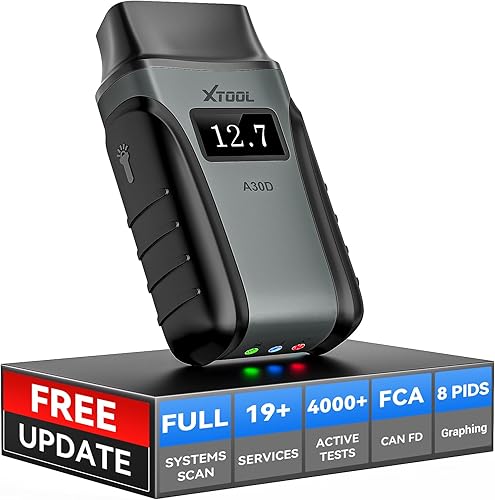
XTOOL A30D Bidirectional Scanner
Best for routine driveway repairs
Which bidirectional scan tools fit different repair needs?
Choose by vehicle coverage first, then workflow and ongoing access. A dedicated tablet, handheld scanner and phone adapter can each suit home repairs, but they create different setup and storage needs.
GadgetLore compared supported systems, active controls, service functions, screen formats and update terms. The Foxwell is a specialist exception in this group: its bidirectional functions focus on ABS rather than all available systems.
| Product | Best for | Connection | Diagnostics | Updates | Our score |
|---|---|---|---|---|---|
| TOPDON AD900 Lite Bidirectional Scanner | dedicated garage diagnostics | Wireless Bluetooth 5.0 VCI | Available systems; codes, live data and active tests | Lifetime free upgrades | 8.5 |
| Innova 5610 Bidirectional Scan Tool | cable-first DIYers | OBD2 cable; vehicle-powered | Enhanced data and active tests on select vehicles | Free updates; no subscription fees | 8.4 |
| TOPDON AD800BT 2 Bidirectional Scanner | frequent maintenance jobs | Bluetooth VCI, up to 33 ft | Available systems; codes, live data and active tests | Lifetime free updates | 8.4 |
| TOPDON AD800BT V2.0 Bidirectional Scanner | mixed-vehicle garages | Wireless Bluetooth VCI, up to 33 ft | Available systems; codes, live data and active tests | Lifetime free upgrades | 8.3 |
| TOPDON TopScan Lite | occasional app users | Bluetooth phone app | Full-system scanning; active tests require advanced access | Advanced access requires subscription after first year | 8.2 |
| Foxwell NT630 Plus ABS Scanner | focused brake repairs | Corded; vehicle-powered | ABS, SRS and standard OBD-II engine functions | Free Wi-Fi updates; no subscription | 8.2 |
| XTOOL A30M Bluetooth Bidirectional Scanner | data-focused phone users | Bluetooth 4.0, up to 33 ft | Available systems; active tests and multi-stream graphing | Lifetime free software updates | 7.9 |
| XTOOL A30D Bidirectional Scanner | routine driveway repairs | Bluetooth with iOS and Android devices | Available systems; active tests and up to 8 PIDs | Lifetime free software updates | 7.3 |
The best bidirectional scan tools for DIY and workshop use
Start with the AD900 Lite for a dedicated diagnostic tablet, then consider the alternatives for a more specific need. None of these recommendations replaces checking the exact function against your vehicle.
TOPDON AD900 Lite Bidirectional Scanner: Best for dedicated garage diagnostics
- Full-system diagnostics
- Wireless Bluetooth 5.0 VCI
- 8-inch touchscreen
- 8 reset services
A dedicated tablet for buyers who want room to read diagnostic information while moving around the vehicle. Check the required function by VIN, especially for specialized service jobs.
Pros
- Large dedicated touchscreen
- Wireless full-system diagnostics
- Lifetime free upgrades
Cons
- Cannot activate TPMS sensors
- DTC repair guide covers select makes and years
The AD900 Lite suits a home garage that needs a dedicated screen for fault diagnosis. Its 8-inch touchscreen gives you more room for menus and live readings than the smaller built-in displays elsewhere in this group.
The wireless Bluetooth 5.0 VCI supports operation up to 33 feet away. That lets you stand where you can observe a supported component while sending its command, instead of stretching a cable across the cabin.
It combines full-system diagnostics with 8 reset services. Choose it when diagnosing different modules matters more than collecting the largest maintenance menu.
There are 2 important limits: it cannot activate TPMS sensors, and its DTC repair guide covers select Chrysler, Dodge, Jeep and Fiat vehicles from 2010–2014. Access to a module does not mean every related physical task is included.
Skip it if you want a pocket-sized adapter or mainly need service procedures better matched by an AD800BT model. Battery analysis also requires the separate compatible BTMobile ProS accessory.
Innova 5610 Bidirectional Scan Tool: Best for cable-first DIYers
- Vehicle-powered handheld
- Enhanced ABS, SRS, transmission and engine data
- Free updates
- No subscription fees
A handheld choice for DIYers who prefer a cable and built-in display to a phone-based setup. Its enhanced functions apply to select vehicles, so confirm coverage before buying.
Pros
- No separate scanner battery to charge
- Free updates without subscription fees
- ASE-Certified support
Cons
- Smaller display than tablet models
- Enhanced functions are not universal
The Innova 5610 suits DIYers who want to plug in a handheld and work from its built-in controls. It draws power from the vehicle, so there's no separate scanner battery to charge before a job.
Its enhanced data covers supported engine, transmission, ABS and SRS systems. Bidirectional functions include fuel pump commands and electronic parking brake retraction on select vehicles.
Innova includes free updates without subscription fees, along with RepairSolutions2 app pairing and ASE-Certified support. The app is an added part of the workflow, while the scanner itself has a 3.5-inch display.
Choose it for familiar handheld operation and a cable connection. Skip it if you want to move freely around the car with a larger display, especially while following several readings.
Use Innova's coverage checker rather than assuming every enhanced function applies to your car. Our Innova 5610 review explains its fit in more detail.
TOPDON AD800BT 2 Bidirectional Scanner: Best for frequent maintenance jobs
- Bidirectional active tests
- 28 service functions
- Full-system diagnostics
- Lifetime free updates
A wireless scanner for buyers who need service procedures alongside fault diagnosis. Its broader maintenance menu is useful only where those functions match your vehicles.
Pros
- 28 service functions
- Dedicated display and wireless VCI
- Lifetime free updates
Cons
- AutoVIN does not work on every car
- Service menus vary by vehicle
The AD800BT 2 suits buyers who expect to perform maintenance procedures as well as diagnose faults. Its 28 service functions include tasks such as injector coding, throttle procedures and ABS bleeding where supported.
That broader menu makes it worth comparing with the AD900 Lite if you handle several kinds of service work. Write down the actual procedures you need, because a higher menu count won't help if your vehicle lacks support.
The tool includes wireless full-system diagnostics, freeze-frame information and live data. TOPDON provides lifetime free updates, which helps buyers planning to keep their scanner for several years.
Choose it for repeated maintenance work with a dedicated display. Skip it if a smaller handheld covers your only vehicle and you don't need the extra service options.
AutoVIN can simplify vehicle selection, but manual VIN entry remains available when automatic identification fails. For ownership costs beyond the initial hardware, see our guide to OBD2 scanners without a subscription.
TOPDON AD800BT V2.0 Bidirectional Scanner: Best for mixed-vehicle garages
- Bidirectional active tests
- 28+ service functions
- Full-system diagnostics
- CAN-FD and FCA AutoAuth support
A dedicated-screen option for garages that need a range of diagnostic and maintenance functions. Confirm the exact version and vehicle coverage rather than choosing by the similar AD800BT names.
Pros
- 28+ service functions
- 6-inch dedicated display
- Wireless full-system diagnostics
Cons
- Similar model names require care when ordering
- AutoVIN may require manual VIN entry
The AD800BT V2.0 suits a garage serving several vehicles that needs both component commands and maintenance routines. It combines 28+ service functions, full-system diagnostics and a dedicated 6-inch display.
Supported procedures include window calibration and coolant bleeding, depending on the vehicle. It also supports CAN-FD communication and FCA AutoAuth access, although those features don't guarantee coverage for every protected command.
The AD800BT names are very similar, so match the exact version and ASIN when comparing your options. Don't assume that 2 near-identical names guarantee the same software package or vehicle-specific menus.
Choose this version when its confirmed coverage fits the cars you work on. Skip it if the AD800BT 2 above already covers your needs and you have no clear reason to choose this version.
TOPDON includes lifetime free upgrades and wireless VCI operation. For a broader brand comparison, read our TOPDON vs Foxwell scan tool guide.
TOPDON TopScan Lite: Best for occasional app users
- Phone-based Bluetooth scanner
- Full-system diagnostics
- Repair information and TopFix AI
- First-year advanced access
A compact choice for buyers who prefer a phone display and flexible access to advanced functions. Bidirectional control, live data, code clearing and service functions require a subscription after the included first year.
Pros
- Compatible with iOS and Android
- Compact adapter
- Monthly, quarterly or annual advanced subscriptions
Cons
- Ongoing subscription needed for advanced functions after first year
- Gateway access requires your own account
TopScan Lite suits occasional users who prefer a phone display and flexible access to advanced functions. Its 28 g adapter takes little storage space, while the app provides repair information and the TopFix AI assistant.
The key buying decision is its access model. Bidirectional control, service functions, live data, code clearing and AI features are included for the first year, then require a monthly, quarterly or annual subscription.
Core functions such as full-system scanning, code reading and repair information remain available. That means keeping basic access is different from keeping the commands that make this a bidirectional tool.
Choose it if you accept that distinction and prefer renewing advanced access when needed. Skip it if you expect to use active controls regularly for years and want scanner software without recurring fees.
Treat AI guidance as a starting point to check against vehicle service information. Our guide to Topdon subscription requirements helps separate update terms from ongoing feature access.
Foxwell NT630 Plus ABS Scanner: Best for focused brake repairs
- ABS and SRS diagnostics
- Supported ABS active tests
- Vehicle-specific ABS Auto Bleed
- Free Wi-Fi updates
A specialist for supported ABS and SRS work rather than broad bidirectional diagnosis. Choose it for a confirmed brake-related function, not as a substitute for full-system access.
Pros
- Supported ABS active tests and Auto Bleed
- No phone app required
- Free Wi-Fi updates
Cons
- No transmission diagnosis or full-system access
- No ABS coding, ABS relearn or airbag crash-data reset
The Foxwell NT630 Plus suits a confirmed ABS-related repair, not a search for broad component control. It offers ABS and SRS diagnostics, supported ABS active controls and vehicle-specific Auto Bleed.
It also handles standard OBD-II engine functions, but does not diagnose the transmission or provide full-system access. SRS diagnosis does not include airbag crash-data reset, and its ABS functions exclude coding and relearn.
Its corded, vehicle-powered design uses a 2.8-inch display. Free Wi-Fi updates and the absence of a required phone app suit buyers who want a self-contained specialist tool.
Choose it when Foxwell confirms your exact ABS procedure and you don't need other modules. Skip it for fuel pump commands, body-system diagnosis or a general-purpose scanner for several kinds of repairs.
For brake bleeding, confirm the vehicle's ABS configuration as well as its model name. Some supported Chrysler, Jeep and Dodge applications may provide automated bleeding only on the right side, so follow the complete service procedure.
XTOOL A30M Bluetooth Bidirectional Scanner: Best for data-focused phone users
- Phone-based active tests
- Full-system diagnostics
- 26+ reset functions
- Up to 8 live data streams
A phone-based option for buyers who want to compare several live readings and use service functions without scanner software subscriptions. FCA AutoAuth access requires a separate paid account.
Pros
- Graphs up to 8 live data streams
- Lifetime free software updates
- 26+ reset functions
Cons
- Requires a compatible phone or tablet
- FCA AutoAuth account is separate
The XTOOL A30M suits phone or tablet users who want to compare live readings while diagnosing a fault. It can graph up to 8 data streams together, helping you follow related changes rather than switching between individual values.
Its full-system access and supported active controls let you combine module information with component responses. The 26+ reset functions also give it a wider service menu than the A30D below.
XTOOL includes lifetime free software updates for app service functions without scanner subscription fees. FCA AutoAuth is separate and requires a paid account for vehicles needing that access.
Choose it if you already have a compatible mobile device and value multi-stream graphs. Skip it if you want a dedicated screen or prefer using a scanner without phone setup.
Don't fill every graph slot just because it's available. Comparing a few relevant signals is usually easier than watching several unrelated readings, especially when you're still learning what each value means.
XTOOL A30D Bidirectional Scanner: Best for routine driveway repairs
- Phone-based active tests
- Full-system diagnostics
- 19 reset functions
- Live-data logging and playback
A phone-based scanner for a defined set of home maintenance and diagnostic jobs. Choose it when its confirmed service coverage meets your needs rather than paying attention only to reset totals.
Pros
- 19 reset functions
- Live-data logging and playback
- Lifetime free software updates
Cons
- Requires a compatible mobile device
- FCA AutoAuth account and subscription are separate
The XTOOL A30D suits home users with a defined list of routine repair tasks. Its 19 reset functions include supported EPB, throttle, battery-management and ABS bleeding procedures.
The phone-based app also provides full-system diagnostics, active controls and live-data logging for playback. It supports Android 9.0+ and iOS 10.0+ devices, so check the phone you plan to use before ordering.
Choose it when those confirmed services cover your needs. Skip it if you need a function supported by the A30M but absent from the A30D, or if handling a phone around the vehicle would get in your way.
XTOOL includes lifetime free software updates, but FCA AutoAuth requires its own account and active subscription. CAN-FD support addresses communication requirements; it doesn't make every service routine available.
For app storage, download the vehicle packages you need rather than every available package. Keep activation details somewhere safe so setup information isn't lost with the packaging.
How do you choose the best bidirectional scan tool for your car?
Match the exact repair function to your VIN before comparing screens or reset totals. Vehicle support has several layers, and basic engine-code access is only the first.
Confirm the best bidirectional scan tool supports your exact task
Ask about the specific command or procedure you need. “Does it work on my car?” is less useful than “Can it run the ABS bleeding routine on this VIN and ABS configuration?”
Provide the year, make, model, engine and VIN. Include the module or component involved, especially if the vehicle has more than one possible equipment package.
Save the coverage response with your order information. If you later need support, you can show the exact function you expected instead of starting the compatibility discussion again.
For systems beyond basic engine codes, use our full-system scanner guide. Our Toyota scanner guide and BMW scanner guide explain what to check for those makes.
Separate module access, active commands and service routines
These are different capabilities. Reading ABS fault codes doesn't prove a tool can activate the ABS pump, and activating that pump doesn't prove it provides the required automated bleeding sequence.
Likewise, a TPMS menu may offer diagnostic information or a reset without activating wheel sensors. Injector coding is a service function, not a promise of general ECU programming.
Use your repair instructions to identify the capability you actually need. This avoids buying a broad scanner that still cannot complete the one job that prompted the purchase.
Choose a display you can use beside the vehicle
Pick a dedicated display for frequent work, or a phone adapter for compact storage. A handheld suits quick cable-based sessions, while a wireless tablet lets you keep your phone free for service information.
A phone adapter makes sense if your mobile device has enough storage, a readable screen and reliable battery life. Plan for dirty hands, incoming calls and where you'll safely place the phone while working.
For a shared garage, decide whose device and account will run the app. Setting that up before a repair is easier than trying to transfer access with the car partly apart.
Compare software access and gateway requirements separately
Free scanner updates don't automatically include every outside service. Security gateway authorization can require another account, subscription or setup step even when scanner software updates are included.
TopScan Lite also separates core access from advanced features after the first year. Check what remains available, rather than treating “the app still works” as proof that active controls remain included.
If several scanners cover your required tasks, use format and ongoing access to narrow the choice. A detailed guide to choosing an OBD2 scanner can help if you're still deciding how much capability you need.
How do active controls help you diagnose a fault?
Active controls help separate a missing command from a missing response. They give you a controlled action to observe, but the result still needs interpretation.
For example, a supported cooling fan command can help you check whether the fan responds when requested. If it stays still, possible causes include the motor, power supply, wiring, control circuit or unmet operating conditions.
A successful command also has limits. A component that works while parked may still have an intermittent fault, fail under load or receive the wrong command during normal driving.
Compare the command with live data where useful. A change in module status or sensor feedback can add context that simply watching the part move would miss.
A fault code points to a problem area, not an automatic parts order. Read its definition, note the conditions in which it appeared and follow the relevant diagnostic steps before replacing anything.
How should you set up a bidirectional scanner before the first repair?
Finish registration, updates and vehicle identification before starting service work. A short setup session helps you find account or coverage problems while the vehicle is still intact.
- Prepare the tool. Charge a rechargeable scanner or phone, register the device and install the needed software using the brand's instructions.
- Check the vehicle battery. Follow service information for voltage support during longer procedures, since low voltage can interrupt communication.
- Connect with the ignition in the required state. Seat the connector fully without forcing it, and route cables away from pedals or moving parts.
- Confirm the vehicle identity. Check AutoVIN results against the actual vehicle, then enter details manually if necessary.
- Save the initial scan. Record codes, module names and freeze-frame information before clearing anything.
- Read the entire procedure. Check engine state, transmission position, fluid temperature and other prerequisites before selecting a command.
Start with code reading and a few relevant live values. Learn how to stop or exit a function before running commands that move parts.
Our OBD2 scanner use guide explains the basic connection and reading workflow. For specialized service functions, the vehicle's repair procedure takes priority over a general scanner tutorial.
Which mistakes cause wasted time or unsafe results?
Clearing evidence too early and running the wrong procedure are avoidable mistakes. Preserve the vehicle's starting information and confirm prerequisites before sending commands.
Clearing codes before recording them can erase useful freeze-frame details and reset emissions readiness monitors. A warning light that stays off briefly after clearing is not proof of a completed repair.
Don't run an active control simply because the menu offers it. Fans, windows, wipers, pumps and other parts may operate unexpectedly, so keep people, tools and loose clothing clear.
Avoid confusing an EPB service routine with a normal parking brake command. Follow the correct sequence before and after brake work, and don't assume a reset replaces mechanical inspection.
ABS bleeding requires the specified fluid handling and complete bleeding procedure. A scanner finishing its automated step does not confirm pedal feel, leak-free plumbing or safe brake operation.
DPF regeneration also has operating conditions and heat risks. Follow the vehicle procedure, including location and exhaust clearance, rather than treating it as a routine warning-light reset.
If a command fails, check vehicle identity, ignition state, gateway access and required conditions first. Repeating the same command without understanding the failure can waste time and obscure the real issue.
How do you care for the scanner and confirm a repair?
Protect the connectors, save useful records and verify the original symptom after repair. Good habits help preserve the tool and make later faults easier to compare.
Disconnect by holding the connector body rather than pulling on its cable. Keep the VCI, cable ends and charging ports dry and free of dirt, and store them where they won't be crushed.
Avoid leaving a display in direct sun or on a hot engine surface. Put the tool back in its case or protected storage area after use, and follow its battery charging instructions.
Install updates before the next job rather than halfway through a service routine. Keep account recovery details and device activation information available, but separate from anything shared publicly.
After completing the repair, rescan the affected systems and check the relevant live values. Follow the specified verification procedure and confirm that the original symptom is resolved before clearing any remaining stored faults.
Save a final report alongside the initial scan. That record can help distinguish a returning fault from an unrelated issue later.
Which best bidirectional scan tool should you buy?
Buy the scanner that supports your next real repair and fits how you'll work. Use this decision order once vehicle coverage is confirmed:
- Choose the AD900 Lite for a dedicated diagnostic tablet with a larger display.
- Choose the Innova 5610 for a vehicle-powered handheld and cable-based sessions.
- Compare the AD800BT versions when repeated maintenance procedures drive your choice.
- Choose TopScan Lite if compact phone use and flexible advanced subscriptions fit your schedule.
- Choose the Foxwell NT630 Plus for a confirmed ABS-focused job without needing full-system access.
- Choose the XTOOL A30M for phone-based graphing and a broader service menu without scanner software subscription fees.
- Choose the XTOOL A30D when its confirmed routine services cover your needs.
The best bidirectional scan tool is the one that can run the required procedure on your vehicle, not simply read its codes. If that distinction is still unclear, read what a bidirectional scan tool does before ordering.
Our top 3 picks at a glance
-
1
Best for dedicated garage diagnostics
TOPDON AD900 Lite Bidirectional Scanner
8.5/10 our score
See it on Amazon -
2
-
3
Best for frequent maintenance jobs
TOPDON AD800BT 2 Bidirectional Scanner
8.4/10 our score
See it on Amazon
Frequently asked questions
What does a bidirectional scan tool do?
A bidirectional scan tool reads information from vehicle modules and sends commands to supported components. It can help you compare a command with the part's response, such as a fan switching on or a window moving.
Available commands depend on both the scanner and the vehicle, so exact function coverage matters.
Does every bidirectional scanner work on every car?
No, a scanner may read a vehicle's engine codes without supporting its ABS bleeding procedure or component commands. Check the year, make, model, engine, VIN and required function before buying.
Our guide to OBD2 scanner compatibility explains why a matching connector does not guarantee every diagnostic feature.
Is a Bluetooth bidirectional scanner enough for home use?
Yes, a Bluetooth scanner can handle home diagnostics when it supports your vehicle and required tasks. Choose a phone adapter if you're comfortable with app setup, phone charging and permissions.
A dedicated tablet or handheld makes more sense if you want a separate display or share the tool with another person.
Can a bidirectional scan tool fix a car?
No, a scan tool helps diagnose faults and perform supported service procedures, but it cannot repair failed wiring or replace worn parts. A component response is one piece of evidence rather than proof that the whole system works.
Use vehicle service information to interpret results and verify the repair before clearing codes.
Do lifetime scanner updates include security gateway access?
Not necessarily, because scanner software updates and vehicle security gateway authorization are separate services. A tool can include lifetime software updates while requiring a separate account or paid access for protected vehicles.
Check both terms before buying, especially when a required repair involves commands or service functions behind a security gateway.