Topdon vs Foxwell Scan Tools: Which Is Better? (November 2026)
For Topdon vs Foxwell, choose the Foxwell NT604 Elite Scanner for diagnostic checks, the TOPDON AD600S Scanner for handheld maintenance routines, or the TOPDON TopScan Lite for phone-based bidirectional controls. Confirm coverage for your exact vehicle and required function before buying.
On this page (10 sections)
- Topdon vs Foxwell: which fits your repair task?
- Who should buy the Foxwell NT604 Elite?
- Who should choose the TOPDON TopScan Lite?
- Who should buy the TOPDON AD600S?
- How do you confirm vehicle compatibility before buying?
- How do the screens and initial setup compare?
- Does Topdon or Foxwell need an ongoing subscription?
- How should you use scan results without replacing parts blindly?
- Which use and storage mistakes should you avoid?
- Which should you choose, Topdon or Foxwell?
Choose Foxwell for diagnostic checks, the TOPDON AD600S for handheld maintenance routines, or the TOPDON TopScan Lite for phone-based component controls. This Topdon vs Foxwell comparison comes down to the job you need to complete on your specific vehicle.
These models serve different buyers, even within the same brand. A warning-light investigation, a battery replacement, and a command to a cooling fan call for different capabilities.
Start with the function your next repair needs, then choose the screen format and ongoing access terms that suit you.


Topdon vs Foxwell: which fits your repair task?
The NT604 Elite suits diagnosis, the AD600S adds maintenance routines, and the TopScan Lite adds supported bidirectional controls through your phone. Choose by task rather than treating either brand as the automatic winner.
Reading codes tells you which faults a control module has recorded. Live data helps you compare current readings with the conditions described in a repair procedure.
A service routine does something different, such as resetting an oil-service reminder or carrying out a supported battery-management procedure. Bidirectional control lets you command a supported component and observe its response.
Those distinctions matter before you buy. A scanner can read a brake-system fault without offering ABS bleeding, and access to an airbag module does not mean it can erase crash data.
Topdon vs Foxwell for warning lights
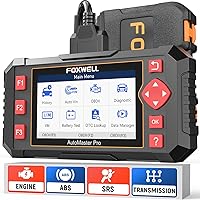
Choose the Foxwell NT604 Elite if your main goal is understanding engine, ABS, SRS, or transmission warnings. It gives you access beyond a basic engine-code reader without adding maintenance routines you may never use.
For the difference between generic code reading and deeper module access, see our code reader vs scan tool guide. Our guide to full-system readers also covers that broader scanner category.
Match the tool to the work you actually do
An owner who reads codes before booking a repair has different needs from someone replacing batteries or servicing electronic parking brakes. Write down your likely jobs instead of choosing the longest feature list.
If your only goal is a basic check-engine explanation, compare simpler tools first. Paying for functions you cannot use on your vehicle adds no practical value.
Who should buy the Foxwell NT604 Elite?
Buy the NT604 Elite for straightforward diagnostic work when you want a separate screen and no maintenance-service requirements. Its focus makes sense for owners who want useful fault information before authorizing repairs or investigating a problem themselves.
It includes live-data streaming, a built-in DTC library, playback, and printing. Playback is useful when you want to review captured information away from the driver's seat rather than remember changing readings.
The I/M readiness menu helps you check emissions-monitor status before an inspection. Readiness and fault codes answer different questions, so check both rather than assuming a dark check-engine light means the car is ready.
Skip this Foxwell if your next job needs a reset or relearn. It does not support oil reset, battery registration, ABS bleeding, throttle relearn, or other maintenance routines.
It also cannot clear crash or collision data from the SRS system. If restraint faults follow a collision, choose the repair route based on the vehicle's service instructions rather than expecting a code-clear command to finish the work.
This is the sensible choice when you plan to diagnose first and leave service procedures to a repair shop. Our Foxwell NT604 Elite review takes a closer look at that role.
Who should choose the TOPDON TopScan Lite?
Choose the TopScan Lite for supported component commands and full-system scanning if you prefer working through a phone. It suits owners who want to move beyond fault descriptions and check how a component responds to a command.
Supported commands include injectors, cooling fans, headlights, the A/C clutch, windows, and wipers. Confirm the exact command for your vehicle, since a component named in the tool's capabilities is not a promise of access on every car.
The app includes vehicle health reports and repair information such as technical service bulletins, code guidance, and a diagnostic-port locator. Its TopFix AI assistant adds repair guidance, translation, and repair logs.
Use that guidance to organize an investigation, then follow the vehicle's repair procedure. A suggested cause still needs supporting evidence before you replace a part.
Skip the TopScan Lite if you want permanent advanced access without renewal. After the first year, bidirectional control, service functions, live data, code clearing, and AI features require a subscription.
Core scanning, code reading, performance checks, and repair information remain available without renewal. That distinction matters because a tool that still reads a fault may no longer let you clear it under its basic access.
Our guide to bidirectional scan tools explains when component commands help and why they differ from ordinary code reading.
Who should buy the TOPDON AD600S?
Choose the AD600S for home maintenance with a built-in screen when your vehicle supports the routine you need. It combines diagnostic checks with service functions without requiring you to use your phone as the display.
Its 9 included functions are oil reset, brake/EPB reset, BMS reset, SAS reset, DPF regeneration, TPMS reset, throttle/ETS relearn, ABS bleeding, and injector coding. Each function remains vehicle-dependent.
For example, battery work may call for a management-system procedure, while brake work may require a specific service mode. Check the vehicle instructions before deciding that a tool's general function name matches the required procedure.
The 5-inch touchscreen supports live data in text or a 4-in-1 merged waveform graph. Comparing related readings on one graph can help you see whether they change together during the conditions described in a diagnostic procedure.
You can also save, share, print, or email reports. A saved report gives a repair shop the original fault information even if the vehicle behaves differently later.
Skip the AD600S if your main requirement is general component actuation. Its service routines are not a substitute for confirmed bidirectional commands, so compare it with the TopScan Lite around that specific need.
How do you confirm vehicle compatibility before buying?
Confirm your exact vehicle, module, and function, rather than relying on a broad brand count. Physical connection to an OBDII port does not guarantee access to every control module or maintenance procedure.
Use this short checklist when asking for coverage confirmation:
- Supply the VIN, model year, make, model, and engine.
- Name the module you need to access, such as ABS or transmission.
- State the exact task, such as reading codes, viewing a particular data item, or performing a service routine.
- Ask whether a gateway account or other access requirement applies.
- If you maintain several vehicles, check each one separately.
The Foxwell supports 60+ brands, while the AD600S supports 90+ and many OBDII-compliant 12V light-duty vehicles from 1996 onward. Those broad ranges help narrow a search but do not settle a specific function question.
TopScan Lite and AD600S support CAN-FD. TopScan Lite also supports gateway access for FCA, Renault, and Nissan vehicles through your own account, while AD600S supports FCA AutoAuth gateway access.
A gateway sits between the scanner and protected vehicle functions. Confirm the account requirements before the repair day so a connection issue does not interrupt the job.
For broader alternatives, use our best OBD2 scanner guide. If brake and restraint warnings are your priority, compare scanners with ABS and SRS coverage.
How do the screens and initial setup compare?
Choose a handheld for a separate display or TopScan Lite for phone-based work. Initial setup is worth completing before you need to diagnose a vehicle away from home.
The Foxwell has a 4.3-inch screen and connects through its OBDII cable. It arrives with software ready to use, and manual VIN entry or vehicle selection is available if AUTOVIN does not identify the car.
Foxwell recommends checking the APP and BooT versions in the Update menu. If a version appears in red text, update it to the latest version.
For TopScan Lite, install the iOS or Android app and follow its Bluetooth connection steps. Allow time to confirm account access and vehicle software before starting a repair that depends on the tool.
The AD600S requires Wi-Fi for initial setup; most basic diagnostics work offline afterward. Its AutoVIN feature is vehicle-dependent, so verify the selected vehicle details before entering a module.
During a first connection, park securely and follow the tool's prompts for ignition position. Keep the cable and phone clear of pedals, belts, fans, and other moving parts.
Does Topdon or Foxwell need an ongoing subscription?
The NT604 Elite and AD600S include free lifetime software updates, while TopScan Lite separates core access from paid advanced access after the first year. Compare the functions you will retain, not just whether updates are available.
TopScan Lite offers monthly, quarterly, and annual advanced-feature plans. An occasional user should decide whether component commands and service routines will be needed often enough to justify continued access.
The AD600S keeps its original service set free. A 30-day trial of 30 special services starts 30 days after activation, then access returns to the original 9 functions.
Do not choose the AD600S around a temporary trial function unless you have confirmed its longer-term availability. A function visible during the trial is not necessarily part of the permanent set.
Our guide to whether Topdon requires a subscription explains why the exact model matters. Brand-level assumptions can lead you to expect access that a particular tool does not include.
How should you use scan results without replacing parts blindly?
Save the fault information before clearing anything, then use it to guide a diagnostic procedure. A trouble code identifies a condition the vehicle detected, which can have more than one cause.
Record the code, its status, the affected module, and any available freeze-frame information. Note the symptoms and when they occur, such as during a cold start or after the engine warms up.
A sensor-related code does not automatically mean the sensor needs replacement. Wiring, connectors, power supply, or another fault can affect the reading, so compare the evidence with vehicle-specific repair instructions.
Avoid reading too much into a single live-data value. Engine temperature, load, speed, and operating state can all change what a normal reading looks like.
After a repair, follow the required code-clearing and verification steps. Some emissions monitors need appropriate driving conditions to complete again, so clearing faults immediately before an inspection can leave readiness incomplete.
For a first-time workflow, follow our guide to using an OBD2 scanner. Keep the original report so you can compare later results with the starting condition.
Which use and storage mistakes should you avoid?
Treat service routines as repair procedures, and store the scanner so it is ready for the next job. Menu access alone does not tell you that the vehicle is prepared for a routine.
Do not start EPB procedures, ABS bleeding, or DPF regeneration simply to explore the menus. Read the vehicle instructions, meet their conditions, and stop if you lack the equipment or knowledge needed to complete the work.
For component commands, clear the area around anything that can move. Keep hands away from fans, wipers, windows, and other parts that may respond to the scanner.
Inspect the diagnostic cable and connector before use, and avoid pulling the cable to remove the plug. Store the Foxwell in its included protective case to reduce damage during transport.
TOPDON recommends charging the AD600S at least once a week, including during storage. Prolonged deep discharge may leave it unable to power on, so include charging in your storage routine.
Which should you choose, Topdon or Foxwell?
For Topdon vs Foxwell, buy the tool that completes your next confirmed job and still fits how you will use it afterward. Vehicle-specific support matters more than the brand name or the longest menu.
Choose the Foxwell NT604 Elite when you want warning-light diagnostics and live data without maintenance routines. It fits an owner who wants better information before deciding what to repair.
Choose the TopScan Lite when supported component commands and broader module access justify using your phone and maintaining advanced access. Confirm both the command and the subscription terms before committing.
Choose the AD600S when you perform supported maintenance procedures and want a dedicated touchscreen with permanent access to its original service set. Check that your needed function is included outside the temporary trial.
Before ordering, write down your VIN and one exact job the scanner must perform. Use our OBD2 scanner buying guide to turn that requirement into a final coverage check.
Frequently asked questions
Is Topdon or Foxwell better for service resets?
The TOPDON AD600S is the better fit for service resets among these handheld models because it includes 9 maintenance functions. The Foxwell NT604 Elite has no maintenance resets or relearns, while TopScan Lite offers supported service routines through its phone app, with renewal required after the first year.
Does the Foxwell NT604 Elite scan ABS and SRS?
Yes, the Foxwell NT604 Elite can access ABS and SRS alongside engine and transmission systems on compatible vehicles. It reads and clears common SRS fault codes unrelated to a crash, but cannot clear collision data, and clearing a code does not repair the cause of a warning light.
Does the TOPDON AD600S require a subscription?
No, the TOPDON AD600S includes free lifetime software updates and keeps its original 9 service functions without an annual software subscription. A free 30-day trial of 30 special services starts 30 days after activation, so confirm your needed routine belongs to the permanent set before relying on continued access.
Does the TOPDON TopScan Lite require a subscription?
TopScan Lite needs a subscription to retain advanced features after the first year, including bidirectional control, service functions, live data, code clearing, and AI features. Core scanning, code reading, performance checks, and repair information remain available without renewal, with monthly, quarterly, and annual plans offered for advanced access.
Which scanner is easier to use without a phone?
Choose the Foxwell NT604 Elite or TOPDON AD600S if you want a built-in screen rather than a phone app. The Foxwell arrives with software ready to use, while the AD600S requires Wi-Fi for initial setup and can perform most basic diagnostics offline after that setup is complete.