Best OBD2 Scanners for DIY Car Owners
The best OBD2 scanner for app flexibility is the OBDLink MX+ Bluetooth Scanner, which supports iPhone, Android, and Windows. Choose BlueDriver for repair reports, Foxwell NT604 Elite for a dedicated screen, or TOPDON TopScan Lite for supported active controls.
On this page (10 sections)
- Which is the best OBD2 scanner for your needs?
- What does an OBD2 scanner actually tell you?
- How do you choose the best OBD2 scanner for your car?
- Should you buy a code reader, enhanced scanner, or bidirectional tool?
- How should you compare update fees and long-term access?
- How do you set up an OBD2 scanner for the first time?
- How do you use scan results without wasting money on parts?
- What mistakes should you avoid with an OBD2 scanner?
- How should you store and care for an OBD2 scanner?
- Which best OBD2 scanner should you buy?
The best OBD2 scanner for DIY owners who want app flexibility is the OBDLink MX+ Bluetooth Scanner. BlueDriver suits drivers who want repair guidance, Foxwell NT604 Elite suits those who prefer a handheld screen, and TOPDON TopScan Lite suits owners who need supported active controls.
Your first decision is the job: read a check-engine light, investigate an ABS warning, record live data, or command a component. Your second is whether the tool supports that job on your exact vehicle.
Buying more functions only helps if you can use them. A scanner that reads your engine codes may still lack access to your airbag module or the service procedure you need.
Which is the best OBD2 scanner for your needs?
The OBDLink MX+ Bluetooth Scanner leads these picks for device and app choice. Choose among the other tools by your preferred workflow, needed systems, and willingness to pay ongoing fees.
GadgetLore compared supported functions, device requirements, and ownership terms. Vehicle-specific coverage matters more than the length of a feature list.
OBDLink MX+ Bluetooth Scanner: Best for app users
The OBDLink MX+ works with iPhone, Android, and Windows, making it the most flexible choice here for owners who want to choose their diagnostic software. OBDLink recommends it for apps including FORScan, Torque, BimmerCode, Dashcommand, AlfaOBD, and Carista.
Score: 9.3/10. The included OBDLink app can graph, log, and export real-time engine data, which helps when you want to save a record rather than read a single code.
Enhanced OEM support includes Ford, GM, Mazda, Nissan/Infiniti, Toyota/Lexus/Scion, Honda, Hyundai, and Kia. Access to individual systems and parameters depends on the vehicle and software combination.
Choose this adapter if you already have a compatible app in mind or want to keep diagnostic records on a computer. It also suits an owner who wants to compare graphs from separate trips while investigating an intermittent condition.
Skip it if you want a dedicated screen or expect every supported app's functions to come with the adapter. Third-party software can have its own compatibility rules and costs, separate from OBDLink's included firmware and software updates.
The adapter includes battery-drain and over-voltage protection, plus an intelligent sleep mode. Those features do not replace checking your vehicle's guidance before leaving an accessory connected.
For more phone-based options, see our best Bluetooth OBD2 scanners guide.
BlueDriver Bluetooth OBD2 Scanner: Best for guided repairs
BlueDriver suits drivers who want diagnostic information and repair guidance in the same phone app. It connects to iOS or Android and provides technician-verified repair reports matched to the vehicle's VIN.
Score: 9.1/10. Full feature access includes free app updates without subscription fees, add-ons, or an account requirement.
On supported vehicles, enhanced diagnostics include ABS, SRS, TPMS, and transmission codes. Its other tools include live data, freeze frames, smog readiness, and Mode 6 results.
BlueDriver supports 1996 and newer North American gasoline vehicles and select light-duty trucks and diesels. Its hybrid support covers standard OBD2 emissions and engine-related codes, while enhanced coverage still needs a vehicle-specific check.
Choose BlueDriver if you want help understanding possible causes before planning your next step. Repair reports are useful for organizing an investigation, but a common fix for a code does not prove your car needs that repair.
Skip it if Windows support or a standalone screen is essential. If your goal is a specific active command or service procedure, get explicit confirmation of that function before choosing it.
BlueDriver is a clear fit for a household that wants to read warnings and keep diagnostic information in one app. Check each family vehicle separately, since coverage for one car does not guarantee coverage for the others.
Foxwell NT604 Elite Scanner: Best for phone-free diagnosis
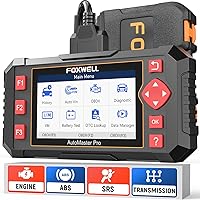
The Foxwell NT604 Elite suits owners who want a corded scanner with its own 4.3-inch screen. It accesses engine, ABS, SRS, and transmission diagnostics on compatible vehicles.
Score: 8.6/10. Live data, a built-in trouble-code library, data playback, and printing support give it more depth than a reader used only to retrieve engine codes.
Choose it if you prefer physical controls and want to keep your phone available for repair instructions. The included diagnostic cable, USB cable, and protective box also suit an owner who wants the scanner stored as a separate garage tool.
Foxwell includes lifetime updates without extra software fees. Its AutoVIN function can identify supported vehicles, with manual VIN entry or vehicle selection available when automatic identification fails.
Skip it for maintenance resets or relearns. It does not support oil reset, battery registration, ABS bleeding, throttle-body relearn, or ABS relearn.
Its SRS coverage includes common non-crash fault codes, but it cannot clear crash data. Reading an airbag fault also does not mean an airbag repair is suitable for DIY work.
The NT604 Elite makes sense when your goal is diagnosis across those 4 systems. Choose a different class of tool if your repair plan depends on service functions.
TOPDON TopScan Lite: Best for active diagnosis
TOPDON TopScan Lite suits DIY owners who need supported bidirectional controls through an iOS or Android phone. These controls let you command components rather than only watch their reported values.
Score: 8.2/10. Supported commands can include injectors, cooling fans, headlights, the A/C clutch, windows, and wipers, depending on the vehicle.
Choose it when you have a defined diagnostic task that needs an active command. For example, commanding a supported cooling fan can help separate a control issue from a fan that fails to respond, though the result still needs proper interpretation.
The included first year covers advanced features such as live data, code clearing, service functions, bidirectional controls, and AI assistance. Keeping those features after the first year requires a subscription, with monthly, quarterly, or annual options.
Core access continues for functions including full-system scanning, code reading, performance checks, and repair information. Do not assume continued code reading also includes continued code clearing.
Service options include supported oil, throttle, electronic parking brake, steering-angle, DPF, ABS, BMS, and airbag functions. The tool also supports CAN-FD and gateway access for certain vehicles, with your own gateway account required.
Skip it if recurring fees conflict with your plans or you only need occasional engine-code checks. Confirm the exact command, service procedure, and account requirements before choosing it.
What does an OBD2 scanner actually tell you?
An OBD2 scanner shows diagnostic information that the vehicle's computers make available. It helps you identify a detected condition and gather evidence about its cause.
A trouble code is a starting point, not a parts order. A code related to an oxygen-sensor signal, for example, can involve the sensor, its wiring, or another condition affecting the reading.
Stored, pending, and permanent codes mean different things
A stored code records a fault that met the vehicle's criteria, while a pending code can show a condition that has not yet met those criteria. Reading both can help you understand whether a fault is established or still developing.
Some vehicles also retain permanent emissions codes. These generally remain until the vehicle completes the required checks and confirms the fault is resolved, even after other codes are cleared.
Freeze frames preserve the conditions around a fault
Freeze-frame information is a snapshot of operating conditions when a relevant fault was recorded. Engine speed, temperature, and load can help explain why a problem appears only during a particular kind of drive.
Save that information before clearing anything. A fault that occurs during a cold start calls for a different investigation from one that appears only after the engine warms up.
Live data shows change, not just a warning
Live data lets you watch supported readings as conditions change. A graph can make a brief drop or an uneven pattern easier to spot than a rapidly changing number.
The useful question is what the reading should do under the current conditions. Collecting dozens of values without a plan can make the cause harder to find.
Our full-system scanner guide covers the broader category when engine information alone is not enough.
How do you choose the best OBD2 scanner for your car?
Choose the least complex tool that covers your actual jobs. Start with vehicle support, then compare module access, diagnostic functions, interface, and ongoing costs.
Write down what you need before comparing scanners. “Read the ABS code on my car” is a useful requirement; “have lots of features” is not.
Does the best OBD2 scanner support your exact vehicle?
Check the year, make, model, engine, and market where the vehicle was sold. Similar model names can hide different electronics, particularly across regions or production changes.
Then ask about the exact function in the exact module. Confirmation of engine-code access does not guarantee ABS live data, transmission access, or a service reset.
If coverage information is unclear, ask the manufacturer a specific question with your vehicle details. Save the response so you have a clear record of what was confirmed.
For several cars, make a separate checklist for each one. A tool can be a strong fit for your daily driver and a poor fit for another car in the driveway.
Which systems do you need to reach?
Engine and emissions diagnostics cover many check-engine-light jobs. ABS, SRS, transmission, body, and other modules can require enhanced vehicle-specific access.
Choose around the warning or task that brought you here. If an ABS warning is your concern, engine compatibility is only the first check.
“Full-system” describes a broader scope, but it does not guarantee every function in every module. Keep module access and function access as separate questions.
What information must you save?
Saved codes and graphs help when a fault returns or when you ask a repair shop for help. Decide whether you need an on-screen result, a phone report, or exportable data.
A useful record includes the date, mileage, symptoms, codes, and operating conditions. This context can be more helpful than a long list of values with no explanation.
Will the interface fit how you work?
A phone-based scanner suits someone comfortable switching between an app, notes, and repair instructions. Check operating-system support and app requirements before buying the adapter.
A handheld tool suits someone who wants a separate device with physical controls. Think about screen visibility, storage, and cable routing where you normally work.
Our guide to how to choose an OBD2 scanner helps turn these requirements into a buying checklist.
Should you buy a code reader, enhanced scanner, or bidirectional tool?
Buy a basic reader for engine-code checks, an enhanced scanner for supported modules beyond the engine, or a bidirectional tool for specific active commands. These are different jobs, even when the devices look similar.
Avoid choosing by the words “professional” or “diagnostic” alone. The functions available on your vehicle determine what the tool can do.
A code reader fits occasional engine warnings
A basic reader can be enough when you want to retrieve engine codes and check emissions readiness. It is a sensible starting point if you plan to use a repair shop for deeper diagnosis.
Check for the individual functions you want, such as pending codes or freeze frames. Simple tools do not all offer the same information.
Enhanced access fits ABS and SRS questions
An enhanced scanner is the better match when your main concern sits outside standard engine diagnostics. It can provide the fault information needed to decide what investigation comes next.
Reading an ABS code does not mean the scanner can bleed the ABS unit. Likewise, reading SRS faults does not mean it can perform every airbag-related procedure.
Our code reader vs scan tool guide explains these differences in more detail.
Bidirectional control fits a defined diagnostic plan
Active controls help when you need to see whether a component responds to a command. They are most useful when you understand the expected response and the conditions required for the procedure.
A component that does not respond may have a power, wiring, mechanical, or control problem. The command narrows the investigation rather than identifying a failed part by itself.
Read our bidirectional scan tool guide if active controls are central to your buying decision.
How should you compare update fees and long-term access?
Compare which functions remain available over time, not just whether a scanner includes updates. Software updates, diagnostic access, third-party apps, and gateway accounts can involve different terms.
A scanner can keep reading codes while losing access to other functions after an included period. That distinction matters if code clearing or live data is part of your normal workflow.
Separate updates from subscriptions
Updates can change vehicle coverage or software behavior. A subscription may instead control your access to certain features, so the 2 terms are not interchangeable.
For these picks, BlueDriver includes full feature access without subscription fees, while Foxwell includes lifetime updates. TOPDON's advanced features require payment after the first year, and OBDLink's third-party app choices need their own checks.
Count the functions you will use again
An occasional owner may only need a special function for one repair. Someone maintaining several vehicles may depend on that function throughout the year.
Plan around likely use rather than buying every available capability. Our OBD2 scanners without a subscription guide is useful if ongoing fees are a deciding factor.
How do you set up an OBD2 scanner for the first time?
Set up the scanner with the vehicle parked, follow its connection instructions, and save the first scan before changing anything. Use the ignition state required by the tool and the vehicle.
Allow time for setup before you have an urgent warning to investigate. A calm first connection makes it easier to learn the menus and confirm vehicle identification.
Locate the port and check the connection
Find the diagnostic connector using the vehicle manual if needed. Align the plug carefully and avoid forcing it into a recessed or awkwardly angled port.
Keep a handheld cable clear of pedals and moving parts. For an adapter, check that its position will not interfere with your legs or vehicle controls.
Prepare the app or handheld software
For a Bluetooth tool, install the correct app and follow its pairing steps. Some tools connect through the app rather than through the phone's general Bluetooth menu.
Give the app the permissions it needs for that connection. If it cannot find the adapter, check the required ignition state and connection process before assuming the vehicle is unsupported.
For a handheld scanner, follow the manufacturer's update instructions and verify the software version. Avoid interrupting an update once it begins.
Confirm the vehicle before scanning
Check the model information even when the tool identifies the VIN automatically. Select the vehicle manually if automatic identification fails or produces the wrong details.
Start with a read-only scan and save the results. This gives you a baseline without erasing information or starting a service procedure.
For a fuller walkthrough, read our guide on how to use an OBD2 scanner.
How do you use scan results without wasting money on parts?
Use codes, symptoms, and related readings together before deciding on a repair. Replacing the component named in a code can waste money when the real fault is elsewhere.
Begin by recording what the car does, when it happens, and whether the symptom is repeatable. A useful description might be rough running only on a cold start or a warning that appears after a long drive.
Save evidence before clearing codes
Record the full code, its status, the module reporting it, and any available freeze frame. Photograph or export the results if the tool offers that option.
Clearing codes can erase clues and reset emissions readiness monitors. It should follow a diagnostic decision, not serve as the first step whenever a warning appears.
Use repair guidance as a plan to verify
Repair reports and code libraries can explain common causes and suggest a sensible order of checks. Match that guidance to your vehicle's service information before disconnecting parts or starting a procedure.
Check simple, relevant causes before buying components. Wiring damage, loose connections, or a leak may explain a fault that initially sounds like a failed sensor.
Review the result after a repair
After the underlying issue is repaired, clear codes only as directed and follow the appropriate verification procedure. Some faults return immediately, while others need specific driving conditions to appear again.
A warning light that stays off for a short period is encouraging, but it is not complete proof of a repair. Check relevant data and readiness status as appropriate.
What mistakes should you avoid with an OBD2 scanner?
Avoid clearing evidence, assuming universal coverage, and starting procedures you do not understand. These mistakes can turn useful diagnostic information into extra work.
Treat a scanner as an information tool first. More menu options create more choices, so pause when a function's purpose or conditions are unclear.
Do not clear codes just before an emissions inspection
Clearing codes can reset readiness monitors to incomplete. A vehicle may then need to complete the required operating conditions before those monitors are ready again.
Readiness is different from having no warning light. Check the status and your local inspection requirements rather than assuming a cleared dashboard means the car is ready.
Do not confuse a reset with a repair
A service reset records or completes part of a maintenance process. It does not replace the physical work, correct fluid level, or repair procedure.
Some service functions move components or change operating states. Read the full instructions before starting, especially around brakes, steering, and emissions equipment.
Do not watch live data while driving
Set up recording while parked, then review the results after stopping safely. If a procedure needs live observation during a drive, a passenger should handle the scanner.
Secure the phone, adapter, and cables so they cannot interfere with vehicle controls. Never reach under the dashboard while the vehicle is moving.
Do not let a scan override a serious symptom
A scanner does not decide whether a vehicle is safe to drive. Brake problems, overheating, severe rough running, or an oil-pressure warning need attention even if the scan result seems minor.
Use a qualified technician when the fault involves a safety system or the cause remains unclear. An empty code screen does not rule out a mechanical problem.
How should you store and care for an OBD2 scanner?
Keep the scanner dry, protect its connector, and store cables without sharp bends. Good storage reduces avoidable connection problems and makes the tool ready when you need it.
Pull on the plug body when disconnecting a cable rather than pulling the wire. Check the connector for dirt or damage before fitting it to the vehicle.
Use a protective case when available and keep the tool away from loose fluids and heavy tools. Avoid leaving a phone or scanner exposed to extreme heat inside a parked car.
Review software and firmware updates before a planned diagnostic job. Do that ahead of time so a download or setup problem does not interrupt work.
For a plug-in adapter, follow the scanner and vehicle guidance on leaving it connected. Remove it when storing the tool, and check for physical interference even if it has battery protection.
Which best OBD2 scanner should you buy?
Choose the best OBD2 scanner by the job you can confirm it will perform on your car. Use this decision list once you have checked vehicle coverage:
- Choose OBDLink MX+ if you want compatible phone and Windows app options, especially for logging and exporting engine data.
- Choose BlueDriver if you want phone-based diagnostics, VIN-matched repair reports, and full feature access without recurring fees.
- Choose Foxwell NT604 Elite if you want a dedicated handheld screen for supported engine, ABS, SRS, and transmission diagnosis.
- Choose TOPDON TopScan Lite if a confirmed active command or service function is central to your work and its ongoing terms suit you.
Before ordering, write down your vehicle details and the 3 functions you expect to use most. Confirm those functions individually, including what remains available after any included access period ends.
If you only need occasional engine-code checks, use our car code reader guide to decide how much tool your next job actually needs.
Frequently asked questions
What is the best OBD2 scanner for a DIY car owner?
The OBDLink MX+ Bluetooth Scanner is the best OBD2 scanner here for DIY owners who want app flexibility across iPhone, Android, and Windows. Choose by the job you need to do, then confirm that your exact vehicle, app, and required functions work together before buying.
Do all OBD2 scanners read ABS and airbag codes?
Basic OBD2 readers usually focus on engine and emissions codes, while enhanced scanners may also read ABS and SRS faults on supported vehicles. Confirm coverage for your exact year, make, and model, since engine compatibility alone does not guarantee access to brake or airbag modules.
Should I buy a Bluetooth or handheld OBD2 scanner?
Choose Bluetooth if you prefer a compatible phone or computer app, and choose a handheld scanner if you want a dedicated screen and wired connection. Compare vehicle coverage first, then consider phone compatibility, app requirements, data storage, and any recurring fees for the functions you need.
Can an OBD2 scanner fix a car problem?
An OBD2 scanner helps identify faults and may clear diagnostic codes after a repair, but it cannot physically repair a failed component or damaged wiring. A code identifies a detected condition, so use related data and the correct repair procedure to find the cause before replacing parts.
Will an OBD2 scanner work on every car?
No single scanner covers every vehicle, module, and function, even when it supports standard engine diagnostics on a car. Check the exact year, make, model, engine, and market, and confirm each needed function separately, especially for enhanced diagnostics, active controls, hybrids, diesels, and electric vehicles.