Code Reader vs Scan Tool: What Is the Difference? (November 2026)
The code reader vs scan tool difference is depth: a reader retrieves trouble codes, while a scan tool can add wider system access, service functions and active controls. Choose by the job you need to do and confirmed support for your vehicle.
On this page (10 sections)
- Code reader vs scan tool: what is the difference?
- Which of these tools suits your repair plans?
- How do you confirm coverage before buying?
- How should you weigh screens, apps and ongoing costs?
- How do you set up a reader or scan tool?
- How do you use live data and active controls safely?
- What mistakes cause wasted repairs or lost information?
- How should you care for the tool between jobs?
- Code reader vs scan tool: which should you choose?
- Sources
A code reader retrieves trouble codes, while a scan tool can add wider system access, service functions and active controls. The code reader vs scan tool choice comes down to the work you plan to do and support for your exact vehicle.
Buy a reader for occasional engine warnings and emissions readiness checks. Choose a scan tool when a known repair calls for ABS or airbag data, a service procedure or a command sent to a component.
The names overlap, so a reader with useful extras may suit you better than a scan tool missing one needed function.


Code reader vs scan tool: what is the difference?
A code reader mainly helps you retrieve and interpret fault codes; a scan tool can help you investigate more systems and carry out supported procedures. Neither label tells you everything a particular model can do.
A diagnostic trouble code identifies a condition the vehicle detected. It doesn't necessarily identify a failed part, even when a component name appears in the description.
An oxygen-sensor-related code, for example, can call for checks of wiring, air leaks or fuel control before replacing a sensor. More diagnostic information helps only when you know how to use it.
Code reader vs scan tool: what can each tell you?
A basic reader can show engine codes, and some also provide live readings and emissions readiness status. That gives an occasional DIY owner useful information before researching a warning or speaking with a repair shop.
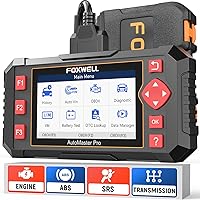
A scan tool may reach ABS, SRS airbags, transmission or other modules. Enhanced readings can help explain a warning that a basic engine reader can't access.
Don't confuse reading a code with diagnosing its cause. A scan tool can provide more clues, but checking wiring, following service information and making physical checks may still be necessary.
What does bidirectional control add?
Bidirectional control lets a tool send commands to supported vehicle systems. Ordinary code reading and live data mainly report information back to you.
Commanding a cooling fan, for example, helps you observe whether it responds without waiting for normal operating conditions to trigger it. A missing response still requires investigation of the component, power supply, wiring and control path.
The bidirectional scan tool guide explains these commands in more detail. Buy this capability when it serves a repair you expect to undertake.
Which of these tools suits your repair plans?
The Innova 5210 suits occasional checks, the Innova 5610 suits regular DIY repairs, and the TOPDON TopScan Lite suits drivers who prefer phone-based diagnostics. Choose among them by your next likely job.
Innova 5210: for understanding an engine warning
The Innova 5210 reads and clears engine codes, displays live engine data and checks emissions readiness. Its extra functions include battery and alternator checks, oil reset and ABS code access where supported.
That combination suits a driver who wants more context before deciding whether to tackle a repair. It also makes sense for routine maintenance when Innova confirms the needed reset for your car.
Skip it if your buying reason is an airbag fault, enhanced transmission data or active component controls. Identify those needs first rather than assuming its extra functions cover them.
Our car code reader guide puts this type of tool alongside other reader choices.
Innova 5610: for a defined DIY repair job
The Innova 5610 offers enhanced data for engine, ABS, SRS and transmission systems on select vehicles. Supported bidirectional functions include fuel pump operation and electronic parking brake retraction, alongside special reset procedures.
It suits an owner who follows repair instructions and needs more than a code description. Confirm the precise procedure you need, because support for one function doesn't guarantee support for another.
Its handheld format gives you a dedicated screen while you work. Free updates and no subscription fees also suit owners who want to keep a tool available between repair jobs.
Skip it if you'll only read an occasional engine code. Its added depth earns its place when you have a specific use for it.
TOPDON TopScan Lite: for working from a phone
The TOPDON TopScan Lite uses an iOS or Android phone for full-system diagnostics. It includes supported active controls, service resets and advanced functions during the first year.
It suits a DIY owner comfortable managing an app and using a phone beside the car. Keep the phone charged and account access ready before starting a job that depends on it.
Skip it if you want continued access to every included function without renewal. After the first year, live data, code clearing, bidirectional control, service functions and AI features require a subscription.
Core access continues for full-system scanning, code reading, performance functions and repair information. Some vehicle gateways also require your own account, so check those requirements before planning a repair.
How do you confirm coverage before buying?
Confirm your vehicle and the exact task, not just the brand name or a broad compatibility claim. Engine diagnostics, airbag access and a parking brake procedure are separate coverage questions.
Write down your vehicle's year, make, model and engine. Include the market it was built for if the coverage checker asks, since similar model names can cover different vehicles.
Then check the function you need:
- Engine warning: code reading, live readings and readiness.
- ABS or airbag warning: access to the affected module and useful data.
- Maintenance: the exact oil, battery or brake service procedure.
- Component diagnosis: the specific bidirectional command.
- Several family cars: separate confirmation for each vehicle.
A tool that reads ABS codes may not perform ABS service procedures. Likewise, access to transmission codes doesn't automatically include relearns or other service functions.
Use Innova's Coverage Checker for either Innova model and TOPDON's compatibility information for TopScan Lite. Ask the brand about any unclear function before buying around it.
If ABS or airbags are your main concern, compare the OBD2 scanners with ABS and SRS coverage. Start with coverage for the affected system, then compare the remaining features.
How should you weigh screens, apps and ongoing costs?
Choose the working format you'll use comfortably, then compare the cost of keeping your required functions available. A dedicated handheld and a phone-based tool can suit different working habits.
A handheld keeps the diagnostic screen separate from your phone. That helps when you want repair instructions open on the phone while reading vehicle information on the tool.
A phone-based tool suits someone comfortable with app setup and software access. Think about where the phone will sit, whether you can read it clearly and how you'll keep it away from moving parts.
Separate update access from function access when comparing ongoing costs. A tool may retain code reading while placing other functions behind a renewal.
The 5210's RepairSolutions2 app has no subscription fees, and the 5610 includes free updates without subscription fees. TopScan Lite's advanced access changes after its included first year, so budget around the functions you intend to keep.
For a broader view of tool formats and capabilities, see our best OBD2 scanners for DIY car owners.
How do you set up a reader or scan tool?
Start with the vehicle parked securely and the tool's instructions open. The correct ignition position and connection sequence can vary, so follow the instructions for your model.
Locate the diagnostic port, usually beneath the dashboard, and inspect it before connecting. Align the plug and seat it firmly without forcing it at an angle.
For the Innova 5210, Innova instructs you to turn the ignition on with the engine off before plugging in. Leave the engine off for the initial connection unless the procedure tells you otherwise.
For a phone-based tool, install the required app and complete account setup before beginning. Finish any required software downloads while you have a stable connection and enough phone charge.
Confirm that the tool identifies the correct vehicle. If identification fails or looks wrong, correct it before relying on system menus or selecting a service function.
Save the initial codes and any available freeze-frame information, which records conditions around a fault. The guide to using an OBD2 scanner explains the reading process.
How do you use live data and active controls safely?
Use live data to answer a specific question, and use active controls only within a procedure you understand. Opening every available screen rarely produces a useful diagnosis.
For live data, choose a small group of related readings and note whether the engine is cold, warming up or fully warm. Compare results with vehicle-specific guidance because normal values depend on operating conditions.
A single unusual reading isn't enough to condemn a part. Check whether the value makes sense alongside related readings, symptoms and fault codes.
Active controls need more preparation because parts may move or switch on. Keep hands, tools and loose clothing clear of fans, belts, windows and other affected components.
Brake service procedures deserve particular care. Confirm the required sequence and support the vehicle correctly before beginning any work that changes brake operation.
Never watch a diagnostic screen while driving. If a repair requires data during a drive, use a suitable recording function or have another person handle the tool.
What mistakes cause wasted repairs or lost information?
The biggest mistakes are replacing parts from a code alone, clearing evidence too soon and assuming coverage. A careful first scan can prevent an avoidable second round of work.
Save codes before clearing them, including which module reported each one. Record the symptoms too, such as whether the fault appears during a cold start or only after driving.
Clearing codes doesn't fix the cause. It can also erase useful fault details and reset emissions readiness monitors.
Those monitors may also reset after a battery disconnect. They need the appropriate drive cycle to complete again, so don't clear codes just before an emissions inspection.
Check readiness separately from the warning light. A light that is off doesn't mean all required monitors have completed.
Don't assume an oil reminder reset, a fault-code clear and a repair verification are the same action. Each serves a different purpose, and a reset should follow the relevant maintenance or repair.
Avoid treating an app's suggested repair as a confirmed diagnosis. Use the suggestion to guide further checks before buying parts.
How should you care for the tool between jobs?
Keep the connector clean, the cable unstressed and software access ready. Basic care helps prevent connection trouble the next time a warning appears.
Disconnect by holding the plug rather than pulling the cable. Store the tool dry and out of direct heat, and inspect connector pins before use.
Keep cables away from pedals and seat tracks during a session. An awkward cable route can damage the lead or interfere with vehicle controls.
Save useful reports with the vehicle name, date and symptoms. That history makes recurring faults easier to discuss with a repair professional and keeps records from different cars separate.
Code reader vs scan tool: which should you choose?
Choose by the next job you can name. In the code reader vs scan tool decision, a confirmed function matters more than a longer menu.
Pick the Innova 5210 for occasional engine warnings and routine checks. Move to the Innova 5610 when a supported repair needs enhanced system data or active controls.
Choose TOPDON TopScan Lite if you prefer working from a phone and accept renewal for advanced access. Confirm your required function before comparing convenience or software extras.
If your needs still span several categories, follow our guide to choosing an OBD2 scanner. For reader options, see the best car code readers; for component commands, use the bidirectional scan tool guide.
Sources
Use brand coverage information to confirm the exact vehicle and procedure before ordering. General model descriptions don't guarantee support for every function.
- Innova 5210 Code Reader information
- Innova 5610 Bidirectional Scan Tool information
- TOPDON TopScan Lite information
Frequently asked questions
Is a scan tool the same as a code reader?
The names overlap, but a scan tool usually offers more diagnostic depth than a basic code reader; that can mean access to more systems, enhanced live readings, service procedures or active controls. Compare the exact functions supported on your vehicle, since the name alone doesn't guarantee capability.
Can a code reader clear a check engine light?
Many code readers can clear engine codes and the check engine light, including the Innova 5210; save the codes and available fault details first, because clearing removes useful clues and resets emissions readiness monitors. The light can return if the underlying cause remains, so clearing isn't a repair.
Do scan tools work on every car?
No, scan tool coverage varies by vehicle and function; basic engine-code access doesn't guarantee support for ABS, airbags, transmission data or service procedures. Check your exact year, make, model and engine, then confirm the specific function you need through the brand's coverage information before you buy.
Do you need a bidirectional scan tool?
You need bidirectional controls when your repair procedure calls for commanding a supported component or system; reading codes, watching engine data and checking readiness don't require that feature. Choose it for a known diagnostic task, and confirm both vehicle support and the procedure before using an active control.
Which should a beginner buy?
A beginner should choose the simplest tool that covers the planned job; a code reader suits occasional engine warnings and readiness checks, while a scan tool makes sense for specific system faults or repair procedures. Being new doesn't rule out advanced tools, but extra menus won't replace repair guidance.