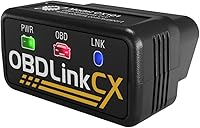
What Is a Bidirectional Scan Tool?
A bidirectional scan tool is a scanner that sends commands to a vehicle’s control module and reads its response. It lets you request supported actions, such as running a cooling fan or fuel pump, to help narrow down a fault.
On this page (7 sections)
- What is a bidirectional scan tool used for?
- How does bidirectional control differ from code reading?
- What can a bidirectional scanner control?
- How do you choose the right bidirectional scan tool?
- How do you set up and use one safely?
- What mistakes should you avoid?
- Is a bidirectional scan tool worth buying for your garage?
A bidirectional scan tool is a scanner that sends commands to a vehicle’s control module and reads its response. If you're asking what is a bidirectional scan tool, the key difference is that it can request an action, such as running a cooling fan.
That makes it useful when a code alone leaves several possible causes. Buy one for specific diagnostic tasks or repair procedures you expect to perform, after confirming vehicle coverage.
What is a bidirectional scan tool used for?
A bidirectional scan tool is used to command supported vehicle functions during diagnosis. These commands are often called active tests or actuator tests.
Suppose a cooling fan does not run when expected. A supported fan command lets you check whether the vehicle can operate it without waiting for normal conditions to trigger it.
If the fan runs, that gives you a different path to investigate than if it stays still. A failed response could involve the motor, fuse, relay, wiring, power supply, or a condition that prevents the command.
The scanner provides evidence, not a parts order. Use that evidence with service information before replacing anything.
For more context on module access, see what full-system readers can do.
How does bidirectional control differ from code reading?
Code reading retrieves stored information; bidirectional control requests an action. Live data adds another view by showing values reported by sensors and control modules.
A trouble code can identify a circuit or operating condition that needs attention. It rarely proves that the part named in the code description has failed.
An active command helps answer a narrower question: can this system carry out the requested action now? Watching the response and relevant live data together can help you decide what to inspect next.
Full-system access and bidirectional control are separate capabilities. A scanner can read several modules without offering active commands for them, as our code reader vs scan tool comparison explains.
What can a bidirectional scanner control?
A bidirectional scanner can control only the functions supported by both its software and your vehicle. Common examples include fans, fuel pumps, lights, windows, wipers, and some brake functions.
The menu may differ between 2 cars from the same brand. Engine choice, model year, installed equipment, and module software can all affect available commands.
An active test also has limits. A component that responds once may still have an intermittent fault, and a command may fail because its required conditions have not been met.
What is a bidirectional scan tool reset function?
A reset function supports a specific maintenance or relearn procedure, rather than simply switching a component on or off. Oil reminders, battery registration, throttle relearns, and electronic parking brake service procedures serve different purposes.
Do not treat a large reset count as proof that a scanner can complete your repair. Check the exact procedure, including any steps needed to return the system to normal operation afterward.
How do you choose the right bidirectional scan tool?
Choose by vehicle coverage, required commands, and ongoing access costs, in that order. A long feature list has little value if your car lacks the function you need.
Before buying, work through these checks:
- Identify the vehicle precisely. Have the VIN, model year, engine, and market ready when asking the brand about coverage.
- Name the actual task. Ask about a cooling fan command or parking brake service procedure, rather than asking only whether your car is supported.
- Check access requirements. Some protected vehicles need a separate gateway account before certain functions become available.
- Choose your working screen. A handheld tool keeps the main controls on its own display; a phone adapter uses your compatible mobile device.
- Compare continuing costs. Separate scanner software subscriptions from any vehicle gateway fees.
For a broader checklist covering codes, live data, and module access, read how to choose an OBD2 scanner.
Who should buy the TOPDON TopScan Lite?
Choose the TOPDON TopScan Lite if you want phone-based diagnostics and flexible subscription periods. Its supported active controls include injectors, cooling fans, headlights, the A/C clutch, windows, and wipers.
It works with iOS and Android and includes repair information such as fault-code guidance and factory service bulletins. That suits DIY owners who want diagnostic tools and reference material in the same app.
Advanced features include bidirectional control, service functions, live data, code clearing, and AI features for the first year. Continuing those features afterward requires a monthly, quarterly, or annual subscription, while core scanning and code reading remain available.
Skip it if you want continuing active controls without a scanner subscription. Before committing, read whether TOPDON requires a subscription and confirm the commands available for your car.
Who should buy the Innova 5610 Bidirectional Scan Tool?
Choose the Innova 5610 if you prefer a handheld scanner with free updates and no subscription fees. It has a 3.5-inch screen and includes an OBD2 cable, protective boot, and storage pouch.
Its supported commands include fuel pump operation and electronic parking brake retraction. Enhanced live data covers systems such as the engine, transmission, ABS, and SRS on compatible vehicles.
This is a sensible fit for an owner who prefers dedicated controls over using a phone as the main interface. Innova also provides US-based technical support and pairs the tool with its RepairSolutions2 app.
Skip it if Innova's coverage checker does not confirm your required procedure. General OBD2 compatibility is not enough to establish access to the particular command or relearn you need.
Who should buy the XTOOL A30D Bidirectional Scanner?
Choose the XTOOL A30D if you want phone-connected diagnostics with included software updates. XTOOL includes free lifetime software updates for its app service functions without a scanner subscription.
It supports Android 9.0 or later and iOS 10.0 or later. Its live data tools can display up to 8 parameters at once and record data for later playback.
The A30D offers 19 reset functions, with availability depending on the vehicle. It suits DIY owners who expect to use maintenance procedures alongside diagnosis and want to review recorded data afterward.
Skip it if you want a dedicated handheld screen. For supported FCA vehicles, factor in a separate personal AutoAuth account and active subscription, even though the scanner's own software updates are included.
How do you set up and use one safely?
Start by reading fault information and checking the procedure's conditions before sending commands. Save codes, freeze-frame information where available, and a vehicle report before clearing anything.
Park on level ground, secure the vehicle, and keep people clear of moving parts. Follow the tool and vehicle instructions for ignition position, engine state, gear selection, and battery voltage.
For phone adapters, install the correct app, activate the device, and download the software needed for your vehicle. Finish registration and updates before starting a repair that could leave the car unable to move.
Follow the app's connection steps, then confirm that it has identified the correct vehicle. Use our OBD2 scanner setup guide for the basic connection and code-reading process.
Read the full command description before selecting it. Fans, windows, wipers, and other parts may move immediately, so keep hands, tools, and clothing out of their path.
Run one command at a time and note what happened. For longer sessions, follow the vehicle's battery-support guidance, and run an engine only in a suitable, ventilated area.
What mistakes should you avoid?
Avoid replacing parts based on one code or one failed command. First check the procedure's conditions and whether the scanner reports a reason the command could not run.
Clearing codes too early is another common mistake. It can remove useful fault information and reset emissions readiness monitors before you have recorded the evidence.
Do not use a reset to hide an unresolved fault or start a brake procedure without knowing how to finish it. Some repairs require mechanical steps, a relearn, and a final check before the vehicle returns to service.
Keep the connector clean and dry, avoid pulling on cables, and store the tool away from fluids and excessive heat. End the diagnostic session as directed before disconnecting, and keep app access details available for the next repair.
Is a bidirectional scan tool worth buying for your garage?
A bidirectional scan tool is worth buying when you have a confirmed use for its supported commands. If your goal is simply to retrieve an engine code, a basic reader may be enough.
The practical answer to “what is a bidirectional scan tool?” is a tool that helps you move from reading a fault to checking how a system responds. Its value depends on coverage and your ability to follow the diagnostic procedure.
Pick TOPDON for phone-based controls with flexible renewal periods, Innova for a handheld format without subscription fees, or XTOOL for phone-based use with included app service updates. Confirm your exact vehicle and task before choosing any of them.
Compare the best bidirectional scan tools for your next step. If you're considering a familiar Bluetooth reader instead, check whether BlueDriver is bidirectional.
Frequently asked questions
What does bidirectional mean on a scan tool?
Bidirectional means the scanner can send supported commands to a vehicle control module and receive information back. For example, it may command a cooling fan to run while you check its response; available controls depend on the exact vehicle, module, and scanner software.
Is a bidirectional scan tool the same as a code reader?
No, a basic code reader retrieves diagnostic trouble codes, while a bidirectional scan tool also sends commands for supported active tests. Reading extra systems, showing live data, and performing service resets are separate features, so check each capability rather than assuming one label includes them all.
Can a bidirectional scan tool fix a car?
A bidirectional scan tool does not repair a failed part, damaged wire, or fluid leak; it helps you gather evidence and may support a required service procedure after repairs. A successful command shows that a function responded under those conditions, but it does not rule out an intermittent fault.
Does every car support bidirectional tests?
No, an OBD2 connection does not guarantee access to bidirectional controls, and supported commands vary between vehicles. Check your make, model, year, engine, and exact procedure with the scanner brand before buying; some vehicles also require a separate security gateway account before certain commands or service functions are available.