Foxwell NT604 Elite Review: Worth It? (November 2026)
The Foxwell NT604 Elite suits DIY owners who need engine, ABS, SRS and transmission diagnostics in a dedicated corded scanner. Choose it for fault diagnosis on compatible vehicles, but choose another tool for maintenance resets, relearns or ABS bleeding.
On this page (10 sections)
- Foxwell NT604 Elite review: what does it do?
- What can the NT604 Elite tell you about a fault?
- What are the NT604 Elite's main limits?
- Is the Foxwell NT604 Elite compatible with your car?
- How do you set up and use the NT604 Elite?
- Which mistakes make scanner results less useful?
- How does it compare with other Foxwell and TOPDON options?
- Who should buy the NT604 Elite, and who should skip it?
- How should you care for a corded diagnostic scanner?
- Should you choose the Foxwell NT604 Elite?
The Foxwell NT604 Elite is a good fit for DIY owners who want to investigate engine, ABS, SRS and transmission faults without using a phone app. Buy it for diagnostic access on a compatible car, rather than for service resets or repair procedures.
Its main appeal is a clear middle ground: more module access than a basic engine code reader, with a dedicated screen and cable connection. The buying decision comes down to the work you expect to do after reading a fault.
Foxwell NT604 Elite review: what does it do?
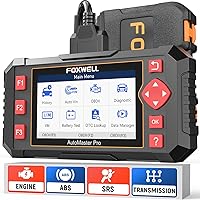
The NT604 Elite helps you read faults and examine diagnostic information from its supported systems. Standard OBDII functions include emissions readiness checks, while live data, a built-in trouble-code library, playback and printing help you work through what the vehicle reports.
Foxwell NT604 Elite Scanner: Best for home fault diagnosis

- Engine, ABS, SRS and transmission diagnostics
- 4.3-inch screen
- Live data and built-in DTC library
- Corded OBDII connection
A dedicated scanner for DIY owners who need to investigate faults beyond basic engine codes. Choose it for diagnosis rather than maintenance resets or brake service.
Pros
- Access to four named control systems
- Live data, playback and printing
- Protective carrying case included
- Lifetime updates without an extra software fee
Cons
- No maintenance resets or relearns
- Module coverage varies by vehicle
- Cannot clear SRS crash or collision data
The 4.3-inch screen gives this scanner its own display, so your phone stays free for repair instructions or notes. Its corded connection also avoids adding phone pairing to the diagnostic process.
What the Foxwell NT604 Elite's system coverage means
The NT604 Elite reaches beyond generic engine codes, but four-system coverage is not full-system coverage. If you need access to another module, such as a body or climate-control module, choose a scanner with confirmed support for that module.
That distinction matters when a car has several warning lights or electrical symptoms. A tool that reaches the engine computer may still leave the module responsible for your problem out of reach.
For a broader view of those differences, see our guide to full-system scanners and their coverage. Start with the module you need, then compare scanners that can communicate with it.
What can the NT604 Elite tell you about a fault?
A fault code gives you a starting point for diagnosis, rather than an instruction to replace a named part. The same code can result from a failed component, damaged wiring, a poor connection or another condition affecting the circuit.
Save the exact code and its status before working on the car. Note the symptoms too, including whether the problem appears during startup, at idle or only after driving.
Live data can help you connect those symptoms with what the vehicle's sensors report. Choose a few relevant readings instead of trying to interpret every value at once.
For an engine warm-up problem, for example, coolant-temperature data may be more useful than a long screen of unrelated readings. Use vehicle-specific repair information to judge what a value should be under the same conditions.
The built-in code definitions help explain unfamiliar terms, but they do not replace a diagnostic procedure. Avoid buying parts solely because their names appear in a code description.
What are the NT604 Elite's main limits?
The NT604 Elite does not perform maintenance resets or relearns. That rules out oil service reset, battery registration, ABS bleeding, throttle body relearn and ABS relearn.
Reading a system and commanding a service procedure are different abilities. An ABS diagnostic menu does not mean a scanner can cycle the pump and valves during brake bleeding.
The same distinction applies to an airbag warning. This Foxwell can read and clear supported common SRS faults unrelated to a crash, but it cannot erase crash or collision data.
Repair the underlying problem before clearing its code. If a fault remains active, clearing the memory will not resolve it and the warning may return.
Skip this model if your planned job depends on one of its missing functions. Our guide to OBD2 scanners with ABS and SRS helps separate diagnostic access from the service features you may also need.
Is the Foxwell NT604 Elite compatible with your car?
Compatibility requires confirmation for your exact vehicle and task, even when the brand is covered. Foxwell supports more than 60 car brands across America, Asia and Europe, but coverage still varies by year, make and model.
Before ordering, gather the following details:
- Vehicle year, make and model.
- Engine size and VIN.
- The module you need to access.
- The exact function you want to perform.
Ask Foxwell to confirm that combination if coverage is unclear. “Works with Ford” is less useful than confirmation that it reads the transmission module on your particular Ford.
For a household with several cars, check each one separately. A scanner that handles your daily driver's engine codes may not provide the same enhanced access on another vehicle.
Our explanation of OBD2 scanner compatibility across cars covers why a matching diagnostic port is only the first requirement. Do this check before comparing screen size or accessory bundles.
How do you set up and use the NT604 Elite?
Start with the vehicle parked securely and the ignition state specified by the scanner and vehicle instructions. Connect the diagnostic cable to the OBDII port, then identify the car before choosing a module.
The scanner arrives with software installed, so an initial software download is not required before diagnosis on a compatible vehicle. Still, check the Update menu for APP and BooT versions, and follow Foxwell's update instructions if either version appears in red.
Use AUTOVIN first if it is available for your car. If identification fails, enter the VIN manually or select the region, brand and vehicle through the Diagnostic menu.
Check the selected vehicle details before continuing. A failed automatic identification does not necessarily mean the tool cannot communicate with the car.
Read and save the codes before clearing anything. Use playback or printing when you need a record to compare after repair or share with a repair shop.
For live data, follow the instructions for whether the engine should be off or running. Keep the cable away from pedals, belts, fans and hot parts, and never operate the scanner while driving.
Our step-by-step guide to using an OBD2 scanner explains the read, record, diagnose and recheck sequence in more detail.
Which mistakes make scanner results less useful?
The biggest mistake is clearing codes before recording the evidence. You may remove information that would help explain an intermittent fault or guide a repair shop.
Another common mistake is treating every stored code as a current failure. Code status, symptoms and the repair procedure all matter when deciding what to investigate first.
Do not assume a warning-free dashboard proves a repair is complete. Recheck the relevant module and follow the vehicle's confirmation procedure after the work.
Clearing emissions-related codes can also reset readiness monitors. If an inspection is approaching, check the I/M readiness menu and allow the vehicle to complete its required monitor conditions rather than repeatedly clearing codes.
A readiness result shows monitor status, not a guaranteed inspection outcome. Local requirements and other vehicle faults can still affect the result.
Finally, stop treating a communication failure as proof of a bad module. Confirm the vehicle selection, cable connection and required ignition state before pursuing a more involved diagnosis.
How does it compare with other Foxwell and TOPDON options?
Choose the NT604 Elite for dedicated fault diagnosis, the NT630 Plus for confirmed ABS service needs, or the TopScan Lite for broader phone-based access. These tools serve different jobs, so a longer feature list does not automatically make one the better buy.
| Scanner | Buyer fit | Main reason to skip it |
|---|---|---|
| Foxwell NT604 Elite Scanner | DIY owner investigating faults in its four supported systems | The planned job requires service resets or relearns |
| Foxwell NT630 Plus ABS Scanner | Owner doing brake work that needs supported ABS service functions | Transmission diagnosis or broader module access is required |
| TOPDON TopScan Lite | Phone user seeking full-system scans and supported active commands | Continued advanced-feature subscriptions do not suit the budget |
Choose the NT630 Plus for a confirmed brake-service task
The NT630 Plus adds vehicle-specific ABS auto bleed and ABS active tests, plus selected oil reset, EPB service and steering-angle calibration functions. Its 2.8-inch screen and free Wi-Fi updates suit owners who want a dedicated device without a paid subscription.
Buy it when Foxwell confirms the exact service procedure your car requires. Auto bleed support varies with the vehicle and ABS configuration, so general ABS coverage is not enough.
Skip it for transmission diagnosis, ABS coding or ABS relearn. Its bidirectional functions focus on supported ABS operations rather than active commands across the whole car.
Automated bleeding also does not replace the vehicle's complete brake-service procedure. Follow the required sequence, fluid guidance and safety checks for the repair.
Choose the TopScan Lite for broader phone-based access
The TopScan Lite suits iOS or Android users who want full-system diagnostics and supported bidirectional control. Those active commands can help check whether supported components respond, while repair information provides another reference during diagnosis.
Its subscription terms need careful attention. Full-system scanning, code reading, performance checks and repair information remain core functions, while bidirectional control, service functions, live data, code clearing and AI features require a subscription after the included first year.
That means continued code reading and continued code clearing have different terms. Consider which functions you expect to use over several years, rather than judging it only by the first year's access.
Skip it if you want a dedicated screen or do not want to budget for advanced-feature access. Read our Topdon vs Foxwell comparison for more context on choosing between these approaches.
Who should buy the NT604 Elite, and who should skip it?
Buy the NT604 Elite if you want to understand supported warning lights before deciding your next step. It fits owners who handle basic diagnostic work themselves and want useful information when a job needs professional repair.
It also makes sense if transmission access matters more to you than brake-service commands. That is a practical reason to choose it over the NT630 Plus, provided your vehicle's transmission module is supported.
Skip it if you only want generic check-engine codes and readiness checks. A simpler reader may meet that narrower need, and our best OBD2 scanners for DIY car owners guide compares the wider choices.
Also skip it if you expect one device to handle every module and maintenance procedure. Write down your next likely repair jobs and buy for those tasks, rather than assuming broader capabilities will appear through an update.
How should you care for a corded diagnostic scanner?
Protect the cable, connector and storage environment to avoid preventable damage. Disconnect by holding the connector rather than pulling on the cable, and check for damaged pins or insulation before the next use.
Return the NT604 Elite to its included protective case once the tool is clean and dry. Keep it away from spilled fluids and store it somewhere protected from extreme heat.
Follow the update instructions without interrupting the connection or power. Update software before a planned repair session so that a compatibility check does not delay the job.
The NT604 Elite includes lifetime updates with no extra software fee. That removes a recurring software cost, but it does not remove the need to confirm coverage for a different vehicle.
Should you choose the Foxwell NT604 Elite?
Choose the Foxwell NT604 Elite when diagnosis is the job and its supported modules match your car. Before ordering, get confirmation for the module you need and check that the next step in your repair does not require a missing service function.
Choose the NT630 Plus for a confirmed ABS service procedure, or the TopScan Lite when broader phone-based access justifies its ongoing advanced-feature terms. For help deciding which modules your work requires, use our full-system scanner guide.
Frequently asked questions
What systems does the Foxwell NT604 Elite scan?
The Foxwell NT604 Elite provides engine, ABS, SRS and transmission diagnostics, along with standard OBDII functions such as emissions readiness checks. Access varies by vehicle year, make and model, so confirm support for the specific module you need rather than relying only on brand coverage.
Can the NT604 Elite reset oil service or bleed ABS brakes?
The NT604 Elite cannot perform oil service resets, ABS bleeding, battery registration, throttle body relearn or ABS relearn. If your planned repair requires one of those tasks, choose a scanner with confirmed support for that exact function on your vehicle, rather than buying for diagnostic access alone.
Can the NT604 Elite clear an airbag light?
The NT604 Elite can read and clear supported common SRS fault codes that are not caused by a crash, after the underlying problem is repaired. It cannot erase crash or collision data, and removing a code is not proof that an airbag system is safe or fully repaired.
Does the Foxwell NT604 Elite need a subscription?
The NT604 Elite includes lifetime updates with no extra software fee and arrives with diagnostic software installed for use on compatible vehicles. Foxwell advises checking APP and BooT versions in the Update menu and updating them when the version number appears in red text.