Do OBD2 Scanners Work on All Cars?
No, OBD2 scanners do not work on all cars or access every system. Match your vehicle’s year, make, model, market, and required functions to the scanner’s coverage before buying.
On this page (10 sections)
- Do OBD2 scanners work on all cars?
- What does OBD2 compatibility actually mean?
- How can you check whether a scanner supports your car?
- Why might engine codes work while ABS or SRS does not?
- Which scanner suits your vehicle and repair plans?
- How do you find the port and start your first scan?
- What should you do if the scanner will not connect?
- Which mistakes make a compatible scanner less useful?
- Do older cars and imported cars need different scanners?
- Which OBD2 scanner should you choose for your car?
OBD2 scanners do not work on all cars, and a compatible car does not give every scanner access to every system. Match the tool to your exact vehicle and the job you want to do.
For US-market passenger cars and light trucks, model year 1996 is the usual starting point. Reading an engine fault is one task; reaching airbag modules, changing settings, or performing a service reset requires separate coverage.
Do OBD2 scanners work on all cars?
No, coverage depends on the vehicle and the function. The car’s original market, model year, communication protocol, and installed modules all matter.
The familiar 16-pin socket provides a connection point. It does not promise that a scanner can communicate with every module behind it.
Standard OBD2 mainly covers emissions-related diagnostics, including engine trouble codes and readiness information. Manufacturer-specific access extends beyond that shared base.
An OBD2-compatible gasoline car can therefore work with a basic reader for a check-engine light while needing a different tool for an airbag warning. Fully electric vehicles also need their own coverage checks because a diagnostic socket does not guarantee support for standard emissions functions.
What does OBD2 compatibility actually mean?
Useful compatibility means the scanner performs your required task on your exact car. Separate that into connection, system access, and function support.
- Connection: The tool fits the port and supports the vehicle’s communication protocol.
- System access: It reaches the engine, ABS, airbag, or other module you need.
- Function support: It can read the required data or perform the specific procedure.
Reading transmission-related powertrain codes does not guarantee full transmission-module access. Likewise, viewing a module’s codes does not mean the scanner can command its components.
For a plain-language explanation of these jobs, see what an OBD2 scanner does.
How can you check whether a scanner supports your car?
Check the exact vehicle and named function through the scanner brand’s coverage tool or support team. A broad claim such as “works with most cars” is not enough for a specific repair.
Have these details ready:
- Model year, make, and model.
- Engine, fuel type, and trim or configuration.
- Original sales market, especially for imports.
- VIN, if the coverage checker requests it.
- The exact task, such as reading ABS codes or registering a replacement battery.
Ask a narrow question: “Does this tool perform ABS bleeding on this vehicle?” gives you a more useful answer than “Does it work on my Toyota?”
Save the coverage result before ordering. Check app requirements, phone support, extra purchases, and update terms at the same time.
Why don't OBD2 scanners work on all cars with matching plugs?
The connector is only one part of compatibility. Software determines which vehicle messages the scanner understands and which functions it can request.
A plug adapter cannot add missing diagnostic software. An older car with a different diagnostic system needs a tool designed for that system, even if an adapter makes the cable fit.
Why might engine codes work while ABS or SRS does not?
ABS and SRS use separate control modules with their own access requirements. Basic engine-code support does not include them automatically.
Choose by the warning light you need to investigate. An airbag warning calls for confirmed SRS coverage; an ABS warning calls for confirmed ABS coverage.
The difference between a code reader and a scan tool explains these capability levels. You can also compare full-system scanner choices when you need broader module access.
Keep code access separate from repair procedures. Reading an ABS fault and commanding an ABS bleeding routine are different functions.
Which scanner suits your vehicle and repair plans?
Choose the narrowest tool that covers your actual jobs. The following options serve different buyers, so confirm coverage before comparing extra features.
OBDLink CX for supported BMW and Mini coding
The OBDLink CX suits BMW and Mini owners who want BimmerCode compatibility. It is designed for that app, which you buy separately, and supports in-app pairing on iOS and Android.
The included OBDLink app handles diagnostics, live parameters, and clearing the check-engine light. Vehicle-specific diagnostics require an in-app purchase.
Choose it when you prefer using your phone and have confirmed the exact BimmerCode settings available for your car. Skip it if you want a standalone screen or have not established support for your intended coding changes.
Sleep mode and overvoltage protection support leaving the adapter connected. Those features do not replace the vehicle and app instructions for safe coding or battery support.
Innova 5210 for routine engine and maintenance checks
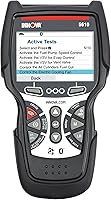
The Innova 5210 suits drivers who want a reader with its own screen and attached cable. It covers most US, Asian, and European vehicles from 1996 onward, with individual functions varying by vehicle.
Its engine live data, emissions readiness display, oil reset, and battery and alternator checks suit routine DIY checks. ABS code access needs confirmation through Innova’s Coverage Checker.
The RepairSolutions2 phone app adds repair guidance without subscription fees. Choose this tool for supported routine jobs; skip it if your main goal is coding, active commands, or a specialized procedure that its coverage checker does not confirm.
LAUNCH Creader Elite 3.0 for Toyota and Lexus module work
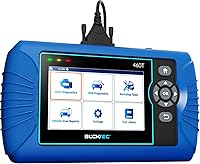
The LAUNCH suits Toyota and Lexus owners who need supported full-system diagnostics and active commands. Its 4-inch touchscreen provides a standalone interface for module scans, live data, and service functions.
Available procedures include functions such as ABS bleeding, steering-angle calibration, and battery relearn, depending on the vehicle. Confirm the precise procedure for your model year and configuration before buying.
LAUNCH includes lifetime updates for the core Toyota and Lexus coverage. Additional brand authorizations have separate terms, and extended updates require renewal.
Skip it for a mixed-brand household unless those added authorizations cover your other vehicles. It is also more capability than you need if your only task is retrieving a standard engine code.
How do you find the port and start your first scan?
Find the port near the driver’s lower dashboard, then follow the scanner’s connection sequence. Your owner’s manual can identify a socket hidden behind a cover or positioned near the center console.
Park securely, apply the parking brake, and keep cables clear of pedals. Inspect the connector for bent pins or debris without probing the contacts.
For the Innova 5210, the instructions call for ignition on with the engine off before plugging in. Other tools may use a different sequence, so follow their instructions rather than assuming one method fits all.
Phone adapters may pair inside their app. Keep Bluetooth enabled, grant required permissions, and avoid having multiple diagnostic apps compete for the connection.
Record codes, freeze-frame information, and readiness status before changing anything. The guide to how to use an OBD2 scanner explains the basic workflow.
What should you do if the scanner will not connect?
Start with power, ignition position, and connection checks before deciding the tool is incompatible. A loose plug or an incorrect app setup can stop communication.
If a cable reader stays dark, check the vehicle manual for the diagnostic-port fuse. Replace a fuse only with the specified type and amperage; a fuse that fails again needs further investigation.
If the tool powers on but cannot reach one module, confirm that module’s coverage. If a phone adapter cannot connect, check the selected adapter, app permissions, and pairing instructions.
Keep plugs clean and dry, and store cables without tight bends. Stop using a damaged connector rather than forcing it into the port.
Which mistakes make a compatible scanner less useful?
The biggest mistake is treating a fault code as a parts order. A code identifies a detected condition, which may involve wiring, a leak, a sensor, or another cause.
Save the diagnostic information before clearing codes. Clearing them or disconnecting the battery can reset emissions readiness monitors, so avoid doing either just before an inspection.
Do not operate a phone or scanner while driving. Use supported logging features or have another person handle the device when road data is needed.
Active commands and service resets need the correct repair procedure and vehicle conditions. Confirm those instructions before running a function, especially one that moves components or changes vehicle settings.
Do older cars and imported cars need different scanners?
Some do, so check the original market and diagnostic standard. The US 1996 guideline does not guarantee compatibility for every imported car, older vehicle, or heavy-duty truck.
Registration year can differ from model year, particularly with imports. Use the vehicle’s identity and original specification rather than relying only on its current registration documents.
For an older vehicle, identify its diagnostic system before choosing a reader or cable. A standard OBD2 reader cannot gain missing system support through a connector change alone.
Which OBD2 scanner should you choose for your car?
Do OBD2 scanners work on all cars? Buy for a confirmed vehicle-and-task match, then choose the interface you prefer.
Pick the OBDLink CX for supported BimmerCode work on a BMW or Mini. Choose the Innova 5210 for confirmed routine engine, readiness, maintenance, and ABS-code needs.
Choose the LAUNCH for supported Toyota or Lexus module scans, active commands, and service procedures. For several vehicles, check every car and required function separately before committing to one tool.
Use our best OBD2 scanners for DIY car owners guide to compare broader options once you know the coverage you need.
Frequently asked questions
Do OBD2 scanners work on all cars?
No, OBD2 scanners do not work on all cars, and compatibility also depends on the job you need done. A tool may read standard engine codes without reaching ABS, airbags, or service functions, so verify your vehicle’s year, make, model, original market, and required system before buying.
What year did OBD2 become standard on cars?
Model year 1996 is the usual starting point for US-market passenger cars and light trucks. Other markets and vehicle classes follow different rules, and that date does not promise access to every module, so check your exact vehicle and the functions you need separately.
Can one OBD2 scanner work on two different cars?
Yes, one scanner can serve two cars when its coverage includes both vehicles and your required functions. Check each car separately, since engine-code support on both does not guarantee matching ABS, airbag, or reset coverage, and app access or added brand authorization may have separate terms.
Do all OBD2 scanners read ABS codes?
No, ABS access is separate from standard OBD2 engine and emissions diagnostics. Choose a scanner that specifically supports the ABS module on your exact vehicle, and distinguish reading or clearing ABS codes from running an ABS bleeding procedure, which needs its own confirmed function coverage.