Can You Leave an OBD2 Scanner Plugged In?
You can leave an OBD2 scanner plugged in if its instructions support that use with your vehicle. Unplug it during long parking periods or with a weak battery, since sleep mode reduces power use without eliminating it.
On this page (7 sections)
- Can you leave an OBD2 scanner plugged in overnight?
- Why can a plugged-in scanner drain the battery?
- Which adapter suits your car and parking routine?
- What should you check before buying a leave-in scanner?
- How should you set up and care for a connected adapter?
- What mistakes should you avoid while driving or parked?
- Can you leave an OBD2 scanner plugged in, or should you remove it?
You can leave an OBD2 scanner plugged in when its instructions support that use with your vehicle. For long parking periods, a weak battery, or an adapter with unclear sleep behavior, unplug it after scanning.
The diagnostic port can supply power even after the ignition is off. A useful buying decision starts with your parking routine, then checks sleep features, phone support, and the functions you need.
Can you leave an OBD2 scanner plugged in overnight?
Overnight use can be reasonable with an adapter designed to stay connected, a healthy battery, and vehicle instructions that allow it. If any of those checks are unclear, remove it before parking.
Daily driving and occasional weekend use create different demands. An adapter left in a car that sits between trips has more time to draw power before the next drive.
Sleep mode lowers power use; it doesn't make the adapter electrically disconnected. Don't use it as a reason to leave a device attached through an extended absence.
When can you leave an OBD2 scanner plugged in for daily use?
Leave it connected for daily use when the adapter supports parked operation and its position stays clear of your legs and controls. This suits drivers who regularly record engine data and would otherwise reconnect it each trip.
Occasional code checks rarely need a permanent connection. If you scan only when a warning light appears, keeping the adapter in its case between uses is simpler.
Why can a plugged-in scanner drain the battery?
An adapter can keep drawing power while the engine is off, and the car's battery must supply it. The effect depends on power draw, parking time, battery condition, and whether vehicle systems settle into their normal sleep state.
Some diagnostic activity may keep vehicle modules awake. Closing an app or losing the Bluetooth connection doesn't mean the adapter and car have both entered sleep mode.
There isn't one safe parking limit for every combination. Avoid fixed promises such as “any scanner is fine for a week” unless the relevant instructions support them.
If starting becomes slow, unplug the adapter while investigating. Repeated battery trouble needs a battery and electrical-system check; removing one accessory doesn't identify the cause.
Which adapter suits your car and parking routine?
Choose sleep features for frequent connected use, and choose diagnostic coverage for occasional scans. Phone compatibility and the exact vehicle functions matter more than buying an adapter solely because it can stay plugged in.
The four options below serve different buyers. Their driving features and parked-use guidance should be considered separately.
OBDLink CX: for BimmerCode users who want a leave-in adapter
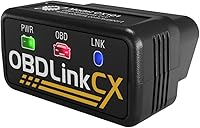
The OBDLink CX suits BMW and Mini owners who want BimmerCode compatibility and explicit support for leaving an adapter connected. OBDLink says its advanced sleep mode and overvoltage protection allow that use.
It works with iOS and Android and includes the OBDLink app for live parameters, diagnostics, and clearing the check-engine light. BimmerCode is sold separately, and vehicle-specific diagnostics can require an in-app purchase.
Check your vehicle and desired coding features with BimmerCode before buying. Support for the app doesn't mean every coding option exists on every model.
Skip the CX if you don't need its BimmerCode focus and would rather choose around another diagnostic app. Sleep protection also doesn't replace the stable vehicle power required for a coding session.
OBDLink LX: for Android and Windows data logging
The OBDLink LX suits drivers using Android or Windows who want logging, live dashboards, and an adapter designed to remain connected. OBDLink says its intelligent sleep mode supports leaving it plugged in without draining the battery.
It includes the OBDLink Android app and OBDwiz for Windows. The Android app can graph, log, and export engine data, which helps you review a drive afterward.
Skip it if you use an iPhone or drive a hybrid or electric vehicle, since those are excluded from its stated compatibility. MotoScan users should also confirm support for their specific motorcycle before buying.
Veepeak OBDCheck BLE: for occasional app-based checks
The Veepeak OBDCheck BLE suits owners who want standard engine-code checks through a compatible third-party app. It supports reading and clearing trouble codes, freeze-frame data, emissions readiness, and live sensor data.
Choose the app first, because it determines the functions available for your vehicle and may require a separate payment. On iOS, connect inside the app using Bluetooth LE rather than pairing through the phone's Bluetooth settings.
Skip it if you need a dedicated service tool for procedures such as ABS bleeding, injector coding, or relearns. BimmerCode support also has limits: pre-2008 models and G and U series vehicles aren't supported with this adapter.
For occasional use, unplug it afterward unless its instructions confirm parked use for your setup. Standard diagnostic support alone doesn't guarantee leave-in suitability.
BlueDriver: for repair guidance and supported enhanced codes
The BlueDriver Bluetooth OBD2 Scanner suits owners who want an included phone app, repair reports matched to their VIN, and enhanced diagnostics on supported vehicles. Available systems can include ABS, SRS, transmission, and TPMS.
Its iOS and Android app has no subscription fees, and free app updates are included. Check exact vehicle coverage before relying on access to a particular module.
Skip it if your main requirement is documented overnight power management. BlueDriver supports live data while driving, but that doesn't guarantee its power behavior after shutdown.
It makes more sense for scanning family vehicles and understanding warning lights than buying solely for permanent installation. Our BlueDriver review explains its diagnostic role in more detail.
Compare phone support and app needs in our guide to the best Bluetooth OBD2 scanners. For handheld alternatives, see our best OBD2 scanners for DIY car owners.
What should you check before buying a leave-in scanner?
Confirm vehicle coverage, app functions, parked-use guidance, and physical clearance before ordering. A plug that fits proves only that the connector fits.
Start with your make, model, year, and powertrain. Then confirm the exact task: standard engine codes, transmission temperature, coding, and service procedures require different levels of support.
Our guide to whether OBD2 scanners work on all cars explains these coverage limits. Hybrid and electric vehicle owners should pay particular attention to app-specific support.
Check the diagnostic port's location, too. Measure the available clearance with your normal seat position so the adapter won't press against your leg or sit in the path of a shoe.
If your needs are still unclear, how to choose an OBD2 scanner helps match functions to the jobs you expect to do.
How should you set up and care for a connected adapter?
Set it up while parked and follow the required ignition sequence. Check the fit and connection before making leave-in use part of your routine.
- Locate the port using the vehicle manual, then inspect it for damage or debris.
- Align the connector and insert it without forcing it or rocking it sideways.
- Install the correct app and select its required Bluetooth connection method.
- Confirm communication and save an initial scan before clearing anything.
- End the diagnostic session as directed, then follow the adapter's parked-use instructions.
For the scan itself, our guide to how to use an OBD2 scanner walks through reading and saving results.
Keep the adapter dry and protect its connector when stored. Grip the housing when removing it, and stop using it if the casing or plug is damaged.
Keep its app and firmware current through the brand's supported update process. Don't interrupt an update or coding operation by pulling the adapter out.
What mistakes should you avoid while driving or parked?
Don't confuse live-data support with permission to leave an adapter connected indefinitely. Driving use, sleep behavior, and physical fit are separate checks.
Set up logging before moving, then review the saved data after parking. A changing gauge display can distract you even when the adapter itself is safely positioned.
Don't clear fault codes just to turn off a warning light. Save the codes and freeze-frame information first; clearing them can remove useful clues and reset emissions-readiness monitors.
Don't assume an unlit LED proves zero power draw. Likewise, a lit LED alone doesn't tell you how much current the adapter uses or whether vehicle modules remain awake.
Avoid frequent unnecessary plugging and unplugging, but don't sacrifice clearance to reduce connector use. An adapter that catches your foot should come out before driving.
Can you leave an OBD2 scanner plugged in, or should you remove it?
Leave an OBD2 scanner plugged in only when you need frequent access and its instructions support your setup. Remove it for long parking periods, battery trouble, unsafe clearance, or unclear parked-use guidance.
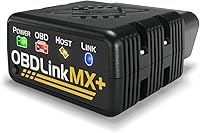
Choose CX for compatible BimmerCode use, or LX for a supported Android or Windows setup. Choose Veepeak for occasional app-based checks, or BlueDriver for its included diagnostic app and repair guidance, then unplug after use unless parked operation is confirmed.
Make the final choice around your car, phone, and actual scan tasks. Browse our Bluetooth scanner guide for the category's related guidance.
Frequently asked questions
Can an OBD2 scanner drain a car battery?
Yes, an OBD2 scanner can contribute to battery drain because the diagnostic port may supply power after shutdown; sleep mode reduces the adapter's draw, but parking time, vehicle behavior, and battery condition still matter. Unplug an adapter with unclear parked-use guidance, and investigate repeated starting trouble rather than assuming the scanner caused it.
Is it safe to leave a Bluetooth OBD2 adapter plugged in?
You can leave a Bluetooth OBD2 adapter connected when its instructions support parked use with your vehicle and it fits clear of the controls; choose explicit sleep-mode guidance rather than relying on Bluetooth alone. Remove it for extended storage, with a weak battery, or if your vehicle's manual advises against leaving accessories connected.
Should I unplug an OBD2 scanner before starting the car?
You don't automatically need to unplug a scanner before starting the car; follow the vehicle and adapter instructions for the required ignition sequence. An adapter that supports live engine data needs to remain connected during that use; before starting, make sure the device and any cable cannot interfere with your feet or controls.
Can I leave a scanner plugged in while driving?
Yes, a scanner that supports live data while driving can remain connected if the vehicle instructions allow it and the fit is secure. Configure the app while parked and use logging for later review; don't handle the phone or watch changing gauges while driving, and remove any adapter that obstructs your feet.